General Catalog Settings
Use the General tab in Site Manager > Catalog Configuration to set catalog listing, search, unit-of-measure, and bulk-request behavior.
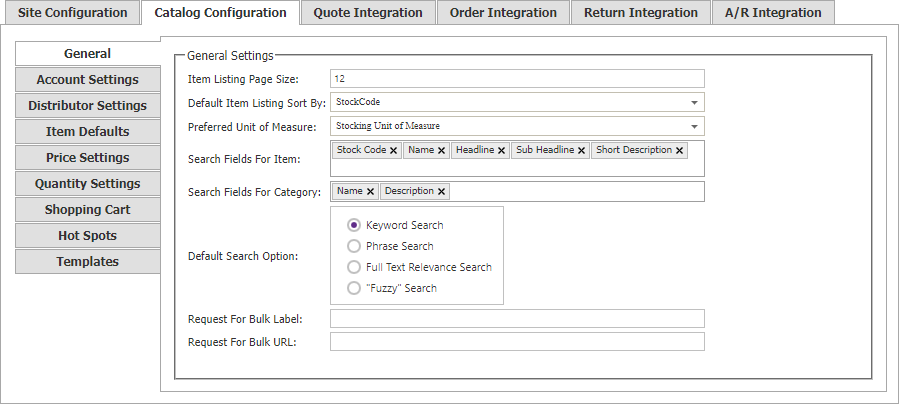
Listing and units
| Setting | Description |
|---|---|
| Item Listing Page Size | Number of items shown in a listing before a shopper must page or scroll. |
| Default Item Listing Sort By | Default ordering for item listings. Options include none, default sort, individual item fields, and combined fields such as Name then Long Description 2. |
| Preferred Unit of Measure | Default item unit when it is defined. Choose Pricing, Stocking, Alternate, or Other Unit of Measure. |
Search fields
Choose the item and category database columns searched by the catalog.
- Item fields include Stock Code, Name, Headline, Sub Headline, Long Description 2, Short Description, Long Description, Title, Meta Description, Meta Keywords, Product Class, and Alternative Part Numbers.
- Category fields include Name, Description, Photo Path, Hierarchy, Title, Meta Keywords, Meta Description, and Category Path.
Default search option
Searches are case-insensitive. Choose the default behavior that best matches how shoppers find products.
| Option | Behavior |
|---|---|
| Keyword | Searches each submitted word separately. |
| Phrase | Matches the submitted text as an exact phrase. |
| Full Text Relevance | Searches combinations of submitted words and ranks results by relevance. |
| Fuzzy | Finds partial matches and ranks results by relevance. |
Bulk-request link
Use Request For Bulk Label and Request For Bulk URL to define the text and destination of the catalog’s bulk-request link.