CheckOutOrderDisplayControl
CheckOutOrderDisplayControl displays a summary of the billing, shipping, payment-method, and shipping-option information for an order.
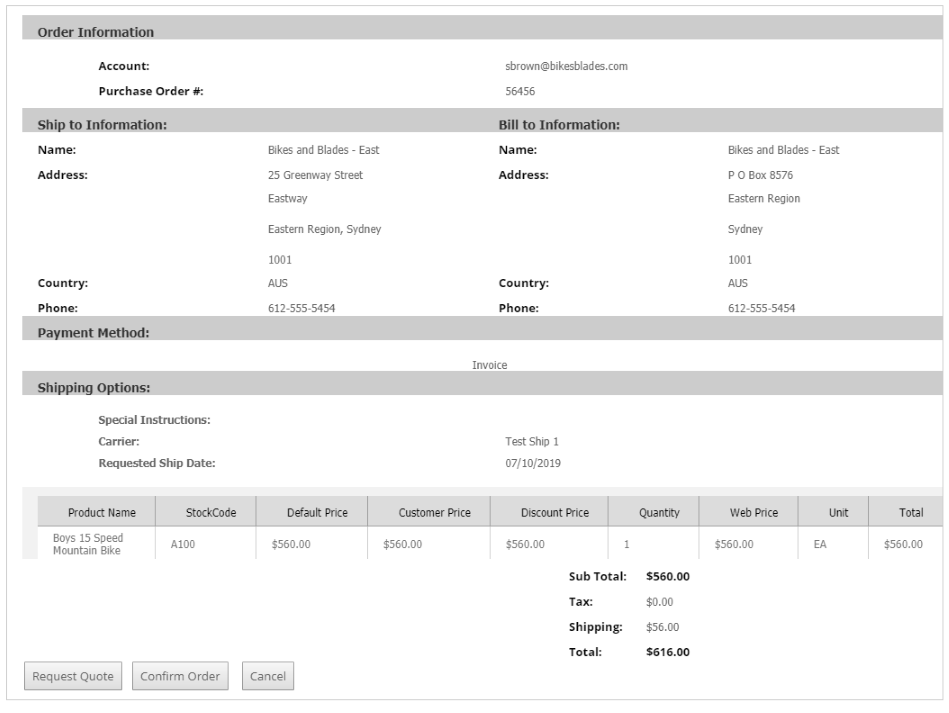
Default subcontrols
The legacy default composition includes these controls:
| Subcontrol | Role |
|---|---|
| CheckOutItemList | Displays the items in the checkout order. |
| CheckOutDisplayOrderTotals | Displays order totals, including shipping, tax, discount, and promotion values. |
Configurable properties
Address labels
| Property | Default | Valid values or format | Effect |
|---|---|---|---|
Address1LineLabelString | Not specified | Sets the first address-line label. | |
Address2LineLabelString | Not specified | Sets the second address-line label. | |
Address3LineLabelString | Not specified | Sets the third address-line label. | |
CityAddressLineLabelString | Not specified | Sets the city label. | |
CountryAddressLineLabelString | Not specified | Sets the country label. | |
PhoneAddressLineLabelString | Not specified | Sets the phone label. | |
StateAddressLineLabelString | Not specified | Sets the state label. | |
ZipCodeAddressLineLabelString | Not specified | Sets the ZIP or postal-code label. |
General display
| Property | Default | Valid values or format | Effect |
|---|---|---|---|
CurrencyCodeString | Not specified | Sets the order currency. | |
ItemDetailsNot specified | Not specified | Sets the item details. | |
NameLabelString | Not specified | Sets the name-field label. | |
OrderDisplayNameString | Not specified | Sets the order-display name. | |
OrderTotalsNot specified | Not specified | Sets the order totals. |
SitePages.config example
The following example loads CheckOutOrderDisplayControl.ascx and applies the documented literal defaults. The following properties are omitted because they do not have documented literal defaults: Address1LineLabel, Address2LineLabel, Address3LineLabel, CityAddressLineLabel, CountryAddressLineLabel, PhoneAddressLineLabel, StateAddressLineLabel, ZipCodeAddressLineLabel, CurrencyCode, ItemDetails, NameLabel, OrderDisplayName, OrderTotals.
<Control src="CheckOutOrderDisplayControl.ascx" />
Add this <Control> element to the appropriate page placeholder as described in The SitePages.config File.
The legacy source does not document allowed values or defaults for
ItemDetailsandOrderTotals. Validate their supported configuration with the target site’s checkout contract.
Inherited properties
CheckOutOrderDisplayControl inherits shared visibility and shopper-access conditions from CyberStoreBaseControl.
Validate the control
- Create an order with billing, shipping, payment, item, and total information.
- Confirm the item list and totals subcontrols render the intended order information.
- Confirm configured address labels and the order display name.
- Test with non-production order data.