ShoppingCartQuickEntryControl
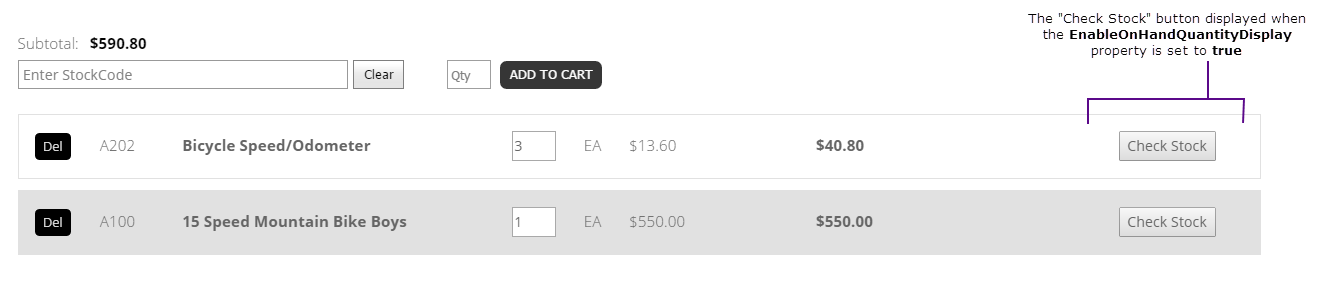
ShoppingCartQuickEntryControl lets shoppers add items directly to the shopping cart. The legacy source identifies real-time server queries through AJAX as part of the experience.

Configurable properties
| Property | Default | Valid values or format | Effect |
|---|---|---|---|
EnableStockCodeFilterBoolean | Not specified | true, false | Controls whether item lookup is available. |
StockCodeFilterModeString | Not specified | Sets lookup matching mode. | |
StockCodeFilterMinimumLengthInteger | Not specified | Sets characters required before lookup. | |
StockCodeFilterDelayInteger | Not specified | Sets lookup delay after typing. | |
StockCodeFilterDropDownLengthInteger | Not specified | Sets displayed lookup-result rows. | |
EnableFilterModeSelectionBoolean | Not specified | true, false | Controls filter-mode selection. |
EnableOnHandQuantityDisplayBoolean | Not specified | true, false | Controls on-hand quantity lookup. |
ShowByWarehouseBoolean | Not specified | true, false | Controls warehouse quantity subtotals. |
WarehouseQuantityMessageNot specified | Not specified | Sets warehouse quantity display markup. | |
LimitedAvailableMessageString | Not specified | Sets available message for limited stock. | |
LimitedUnavailableMessageString | Not specified | Sets unavailable message for limited stock. | |
UnlimitedAvailableMessageString | Not specified | Sets available message for unlimited stock. | |
UnlimitedUnavailableMessageString | Not specified | Sets unavailable message for unlimited stock. | |
AddToCartButtonTextString | Not specified | Sets add-to-cart action label. | |
AddToCartButtonCssClassString | Not specified | Sets add-to-cart CSS class. | |
CheckStockButtonTextString | Not specified | Sets check-stock action label. | |
CheckoutButtonTextString | Not specified | Sets checkout action label. | |
QuantityEmptyHintTextString | Not specified | Sets the quantity-input hint. | |
QuantityInputCssClassString | Not specified | Sets the quantity-input CSS class. | |
QuantityInputEnterBehaviorString | Not specified | Sets Enter-key behavior for quantity input. | |
StockCodeEmptyHintTextString | Not specified | Sets the stock-code-input hint. | |
StockCodeCssClassString | Not specified | Sets the stock-code-input CSS class. | |
DefaultFocusedElementIDString | Not specified | Sets the initial focused element. | |
AfterQuantityFocusedElementIDString | Not specified | Sets the focus target after quantity entry. | |
AnimatedLoadingGifString | Not specified | Sets the loading indicator asset. | |
ShowColumnHeaderBoolean | Not specified | true, false | Controls grid column headers. |
ShowInlineOnHandQuantityBoolean | Not specified | true, false | Controls inline on-hand quantity. |
SelectedStockCodeFormatStringString | Not specified | Sets selected stock-code formatting. | |
RestrictedOrderingTextString | Not specified | Sets text for restricted ordering. | |
CustomerPriceColumnHeaderTextString | Not specified | Sets the customer-price header. | |
DefaultPriceColumnHeaderTextString | Not specified | Sets the default-price header. | |
DescriptionColumnHeaderTextString | Not specified | Sets the description header. | |
DiscountPriceColumnHeaderTextNot specified | Not specified | Sets the discount-price header. | |
ExtPriceColumnHeaderTextString | Not specified | Sets the extended-price header. | |
OnHandQuantityColumnHeaderTextString | Not specified | Sets the on-hand-quantity header. | |
QuantityColumnHeaderTextString | Not specified | Sets the quantity header. | |
StockCodeColumnHeaderTextString | Not specified | Sets the stock-code header. | |
UnitPriceColumnHeaderTextNot specified | Not specified | Sets the unit-price header. | |
WebPriceColumnHeaderTextNot specified | Not specified | Sets the web-price header. | |
EnableAutoAddToCartOnItemSelectBoolean | Not specified | true, false | Controls automatic add-to-cart on item selection. |
QOEJavascriptString | Not specified | For internal use only. |
SitePages.config example
The following example loads ShoppingCartQuickEntryControl.ascx and applies the documented literal defaults. The following properties are omitted because they do not have documented literal defaults: EnableStockCodeFilter, StockCodeFilterMode, StockCodeFilterMinimumLength, StockCodeFilterDelay, StockCodeFilterDropDownLength, EnableFilterModeSelection, EnableOnHandQuantityDisplay, ShowByWarehouse, WarehouseQuantityMessage, LimitedAvailableMessage, LimitedUnavailableMessage, UnlimitedAvailableMessage, UnlimitedUnavailableMessage, AddToCartButtonText, AddToCartButtonCssClass, CheckStockButtonText, CheckoutButtonText, QuantityEmptyHintText, QuantityInputCssClass, QuantityInputEnterBehavior, StockCodeEmptyHintText, StockCodeCssClass, DefaultFocusedElementID, AfterQuantityFocusedElementID, AnimatedLoadingGif, ShowColumnHeader, ShowInlineOnHandQuantity, SelectedStockCodeFormatString, RestrictedOrderingText, CustomerPriceColumnHeaderText, DefaultPriceColumnHeaderText, DescriptionColumnHeaderText, DiscountPriceColumnHeaderText, ExtPriceColumnHeaderText, OnHandQuantityColumnHeaderText, QuantityColumnHeaderText, StockCodeColumnHeaderText, UnitPriceColumnHeaderText, WebPriceColumnHeaderText, EnableAutoAddToCartOnItemSelect, QOEJavascript.
<Control src="ShoppingCartQuickEntryControl.ascx" />
Add this <Control> element to the appropriate page placeholder as described in The SitePages.config File.
QOEJavascript is explicitly identified by the legacy source as internal-only and is not a supported public configuration property.
Inherited properties
The control inherits shared visibility and shopper-access conditions from CyberStoreBaseControl.
Validate the control
- Add an eligible item directly to the cart.
- Confirm that the item is added with the expected quantity.
- Confirm the shopper receives an appropriate response for an unavailable item.