Item Pricing Settings
Use the Pricing tab to select the price source, apply item discounts or surcharges, manage cached prices, and control displayed units.
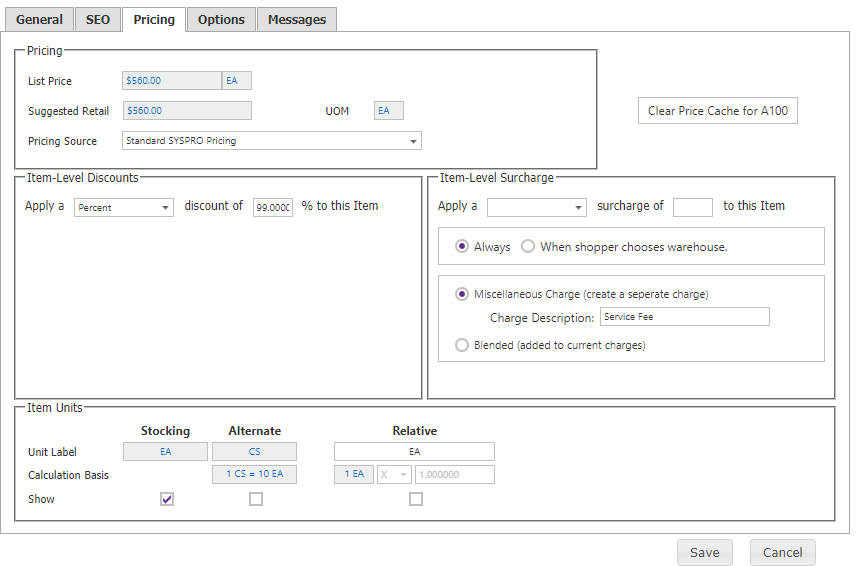
| Setting | Description |
|---|---|
| Pricing Source | Standard SYSPRO Pricing or Trade Promotion Management Pricing. |
| Item Level Discounts | Amount or percentage discount applied to the SYSPRO unit price. Set to 0 to remove it. |
| Item Warehouse Selection Surcharge | Amount or percentage service fee when the selected ship-from warehouse differs from the item warehouse. Item-level surcharges take precedence over category-level surcharges. |
| Clear Price Cache | Removes cached pricing for the item for all customers; prices recache as shoppers browse. |
| Available Units of Measure | Selects the SYSPRO units shoppers can purchase. |
| Relative UOM | Shows a relative UOM, conversion formula, and conversion value when it differs from the pricing UOM. |
| List Price | Read-only list price loaded with item data. |
Category and item discounts follow the Catalog Configuration compounding rule.