CommonStateDropDownControl
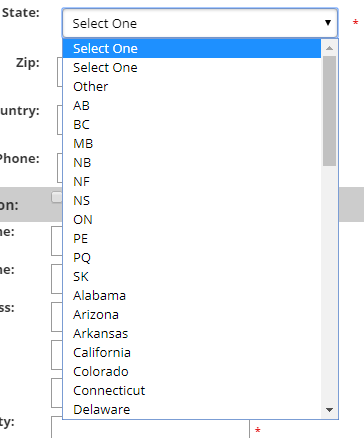
CommonStateDropDownControl displays the available states in a drop-down list.
Configurable properties
| Property | Default | Valid values or format | Effect |
|---|---|---|---|
SelectOneTextString | Not specified | Sets the select-one prompt. | |
PreSelectedStateString | Not specified | Sets a preselected state. | |
StateDropDownListNot specified | Not specified | Exposes the state list used by the control. | |
stateindexInteger | Not specified | Gets the selected state index. | |
statelongnameString | Not specified | Gets the selected state long name. |
SitePages.config example
The following example loads CommonStateDropDownControl.ascx and applies the documented literal defaults. The following properties are omitted because they do not have documented literal defaults: SelectOneText, PreSelectedState, StateDropDownList, stateindex, statelongname.
<Control src="CommonStateDropDownControl.ascx" />
Add this <Control> element to the appropriate page placeholder as described in The SitePages.config File.
Inherited properties
The control inherits shared visibility and shopper-access conditions from CyberStoreBaseControl.
Validate the control
- Display the control in the intended shopper form.
- Confirm that available states appear in the drop-down.
- Confirm the selected state is accepted by the surrounding form.