Populate Price Cache
Use the Populate Price Cache Operation to pre-load CyberStore with current SYSPRO pricing for selected customers. The Command is BuildPricingCache.
Cached prices reduce the need for slower SYSPRO price queries when the storefront needs item pricing. Schedule this Operation when pricing should be prepared before shopper activity or refreshed at a regular interval.
Configure the Operation
Open Tools > Operation Center and select Add. On the General tab, enter a meaningful description and choose the BuildPricingCache Command.
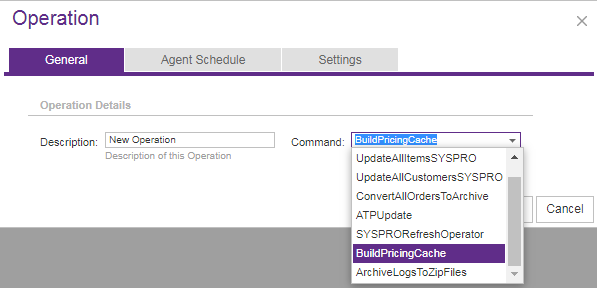
Use Agent Schedule to run the Operation immediately or at a specified date and time. On Settings, select the Site and optionally identify the Customers and Customer Classes whose pricing should be cached.
Choose the customer scope
If no Agent Parameters are entered, the Operation caches prices only for the selected Site’s default Customer. Use the supported parameters to expand or target that scope.
| Parameter | Purpose | Accepted values and examples |
|---|---|---|
Customers | Caches prices for explicitly named Customer numbers. | Customer numbers with or without leading zeroes; use Default for the Site’s default Customer. |
Classes | Caches prices for Customers assigned to the named CyberStore Customer Classes. | Comma-separated Class names, such as Classes: Consumer, Dealer. |
The parameters can be used separately or together. When both are present, the scope includes the named Customers and the Customers in the named Classes.
Production releases intentionally do not write every individual pricing error from this Operation to the CyberStore Event Log. Debug builds record all encountered errors in the Event Log.
What happens during processing
CyberStore identifies the Customers in scope, queries SYSPRO for their applicable item prices, and stores the results in the price cache for the selected Site. The amount of work grows with the number of Customers and items represented by the chosen scope, so schedule broad cache builds accordingly.
Review the result
After the Operation finishes, review its Summary and Message details in Operation History. Confirm that the selected scope completed successfully before treating the cached prices as current. For a production system, use the Operation result rather than expecting every individual price-query problem to appear in the Event Log.