Price Settings
Use the Price Settings tab in Site Manager > Catalog Configuration to control price visibility, default pricing, and price-related shopper messages.
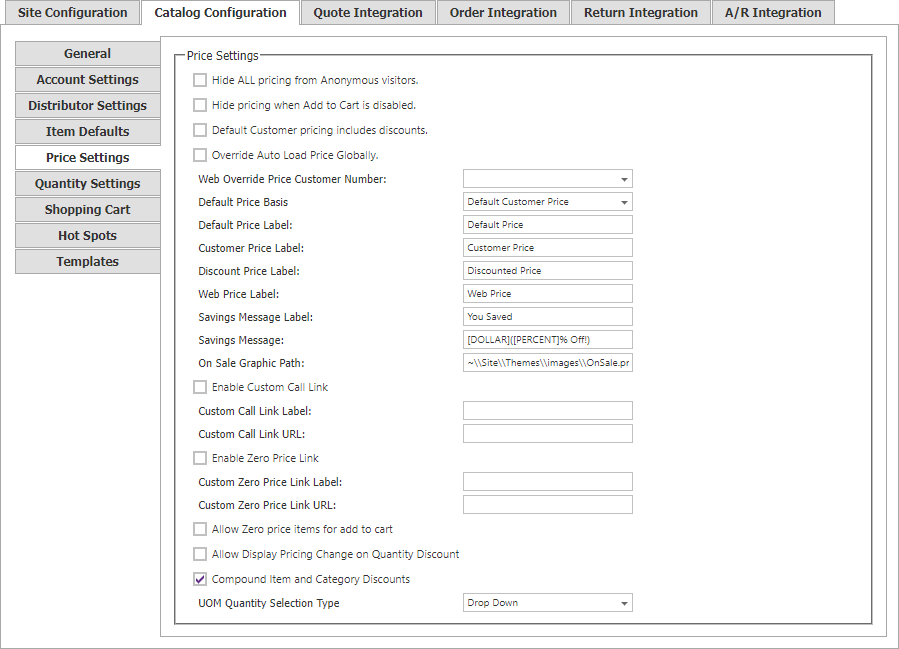
Price visibility and selection
| Setting | Description |
|---|---|
| Hide ALL pricing from Anonymous visitors | Hides item prices until the visitor signs in. |
| Hide pricing when Add to Cart is disabled | Hides prices when the visitor cannot add to the cart. |
| Default Customer pricing includes discounts | Enable when the Default Customer’s SYSPRO pricing is based on an external discount. |
| Override Auto Load Price Globally | Uses a single price source instead of a specific customer’s pricing. |
| Web Override Price Customer Number | Price code used for the global customer-pricing override. |
| UOM Quantity Selection Type | Controls the UI used to group or choose multiple units of measure in CatalogPricingControl. |
Unavailable and zero pricing
Use Enable Custom Call Link, its label, and optional URL to present a custom message when SYSPRO pricing is unavailable. Use Enable Zero Price Link and its label and optional URL for items whose returned price is 0.00.
Enable Allow Zero price items for add to Cart only when zero-priced lines should be purchasable. Enable Allow Display Pricing Change on Quantity Discount to recalculate the displayed price as quantity changes where quantity pricing is available.
CyberStore discounts
Compound Item and Category Discounts combines category and item discounts, applying the category discount first. When disabled, CyberStore uses the higher of the item and category discounts.