Testing CyberStore Connect
The CyberStore Test Template includes a Classic ASP test application in the ConnectTest folder of the OutdoorsSite installation folder.
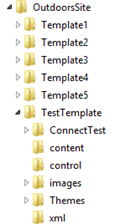
To add the test application to an existing theme:
- Copy the ConnectTest folder to the physical path mapped to the
/Ecommerce/Sitevirtual directory. - Open
/Ecommerce/Site/ConnectTest/default.aspin a browser. - Register the application in the CyberStore Management Console and generate a client code.
- Set the generated client code in the test application’s
default.aspscript.
The test application guides you through the connection process.