CatalogItemQuickOrderEntry
CatalogItemQuickOrderEntry lets shoppers enter stock codes and quantities, then add items directly to the cart.
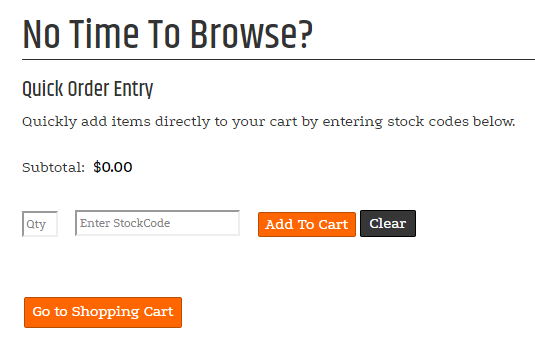
Configurable properties
| Property | Default | Valid values or format | Effect |
|---|---|---|---|
DeletedRowWarningMessageString | " Click OK to remove the item from the order\\n\\n Click CANCEL to continue without removing the item." | Sets the warning shown for a deleted row. | |
EnableOnHandQuantityDisplayBoolean | Not specified | true, false | Controls on-hand quantity display. |
GoToCartButtonTextString | "Go to Cart" | Sets the Go to Cart button text. | |
LimitedAvailableMessageString | "[QTY] [UOM] In Stock" | Sets the message for available limited-quantity items. | |
LimitedUnavailableMessageString | "Out of Stock" | Sets the message for unavailable limited-quantity items. | |
RowsInteger | 20 | Sets the number of order-entry rows. | |
UnlimitedAvailableMessageString | "[QTY] [UOM] In Stock" | Sets the message for available unlimited-quantity items. | |
UnlimitedUnavailableMessageString | "Out of Stock" | Sets the message for unavailable unlimited-quantity items. |
SitePages.config example
The following example loads CatalogItemQuickOrderEntry.ascx and applies the documented literal defaults. The following properties are omitted because they do not have documented literal defaults: EnableOnHandQuantityDisplay.
<Control src="CatalogItemQuickOrderEntry.ascx"
         DeletedRowWarningMessage=" Click OK to remove the item from the order\\n\\n Click CANCEL to continue without removing the item."
         GoToCartButtonText="Go to Cart"
         LimitedAvailableMessage="[QTY] [UOM] In Stock"
         LimitedUnavailableMessage="Out of Stock"
         Rows="20"
         UnlimitedAvailableMessage="[QTY] [UOM] In Stock"
         UnlimitedUnavailableMessage="Out of Stock" />
Add this <Control> element to the appropriate page placeholder as described in The SitePages.config File.
Inherited properties
CatalogItemQuickOrderEntry inherits shared conditions from CyberStoreBaseControl.