Checkout Options
Use the Checkout Options tab in Site Manager > Order Integration to set minimum-order rules, reference fields, requested ship dates, and submission confirmation behavior.
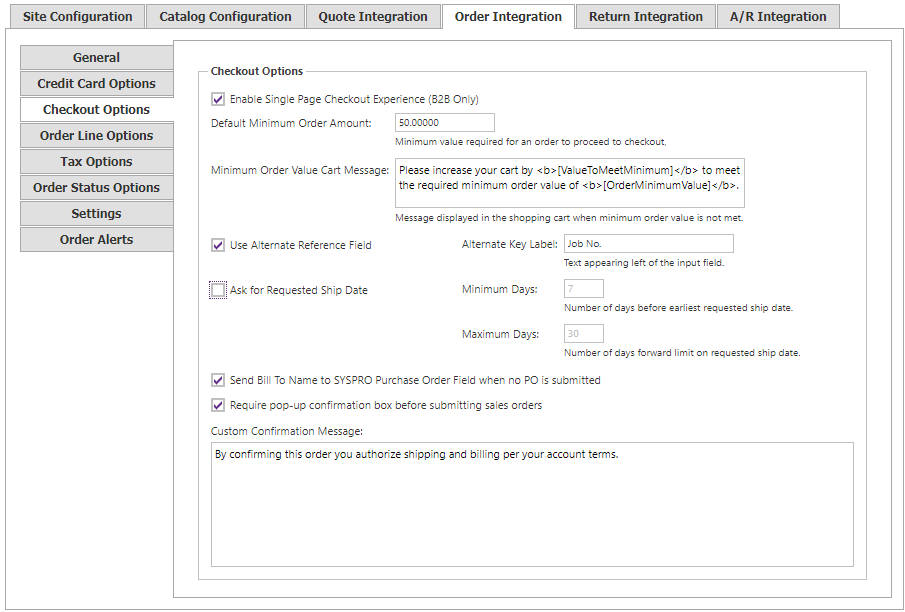
| Setting | Description |
|---|---|
| Default Minimum Order Amount | Minimum pre-tax order value required before a shopper can place an order. |
| Minimum Order Value Cart Message | Message shown in the cart when the minimum value has not been reached. |
| Use Alternate Reference Field | Uses the alternate reference field during checkout. |
| Alternate Key Label | Text displayed beside the alternate-reference input. |
| Ask for Requested Ship Date | Lets shoppers choose a requested ship date. |
| Minimum Days | Earliest number of days before a requested ship date. |
| Maximum Days | Furthest number of days forward a shopper can request. |
| Send Bill To Name to SYSPRO Purchase Order Field when no PO is submitted | Sends the bill-to name to SYSPRO’s Purchase Order field if the shopper does not submit a PO. |
| Require pop-up confirmation box before submitting sales orders | Requires shoppers to confirm before an order is submitted. |
| Custom Confirmation Message | Text displayed in the pre-submission confirmation dialog. |