Path Settings
Use the Path tab in Site Manager > Site Configuration to maintain the site folders, filenames, and custom-content locations used by CyberStore.
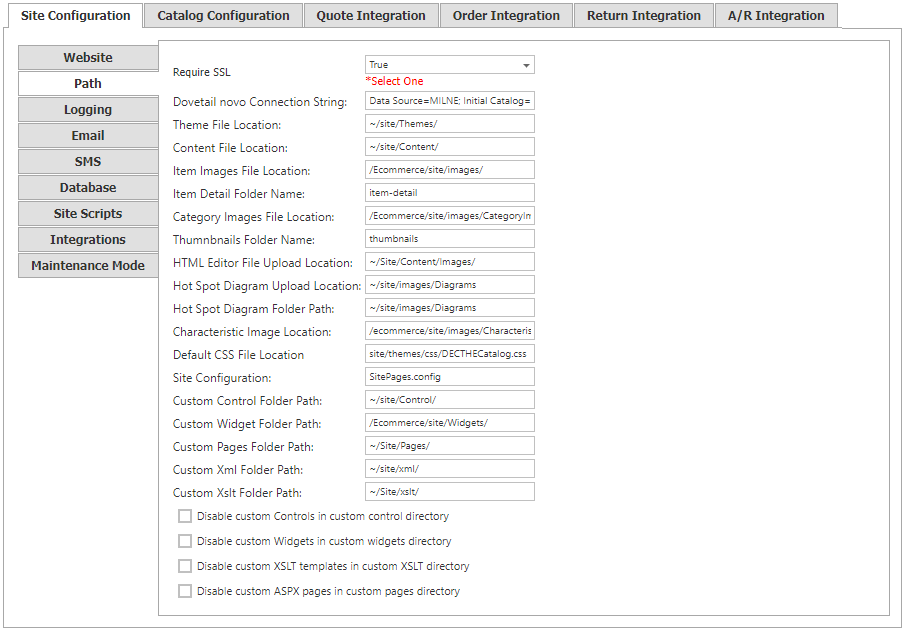
Site Manager changes take effect immediately. A confirmation mark appears next to the changed field and disappears when the change is saved.
Connection security
| Setting | Description |
|---|---|
| Require SSL | Set to true to use HTTPS for the entire CyberStore site. When set to false, registration and checkout still use HTTPS, while catalog and content pages default to HTTP. |
Site content locations
Use these settings to identify the files and folders used by the site’s theme and content.
| Setting | Description |
|---|---|
| Theme File Location | Location of the site’s theme file. |
| Content File Location | Location of the site’s content file. |
| Item Images File Location | Location of the item-images folder. |
| Item Detail Folder Name | Folder containing item details. |
| Category Images Folder Location | Location of the category-images folder. |
| Thumbnails Folder Name | Folder containing site thumbnails. |
| HTML Editor File Upload Location | Location used for HTML Editor uploads. |
| Hot Spot Diagram Upload Location | Location used for Hot Spot Diagram uploads. |
| Hot Spot Diagram Folder Path | Location of the site’s Hot Spot Diagram folder. |
| Characteristic Image Location | Location of characteristic images. |
| Default CSS File Location | Location where the site’s CSS files are automatically saved. |
| Site Configuration | Name of the site configuration file, typically SitePages.config. |
Custom-content locations
| Setting | Description |
|---|---|
| Custom Control Folder Path | Location of the site’s custom controls. |
| Custom Widget Folder Path | Location of the site’s custom widgets. |
| Custom Pages Folder Path | Location of the site’s custom pages. |
| Custom XML Folder Path | Location of the site’s custom XML folder. |
| Custom XSLT Folder Path | Location of the site’s custom XSLT folder. |
Temporarily use default content
The following switches disable the corresponding custom content and make CyberStore use its default content instead:
- Disable Custom Controls
- Disable Custom Widgets
- Disable Custom XSLT Templates
- Disable Custom ASPX Pages
These switches are useful for troubleshooting customizations, but are not recommended for production use.