Website Settings
Use the Website tab in Site Manager > Site Configuration to maintain the core settings required to operate a CyberStore site.
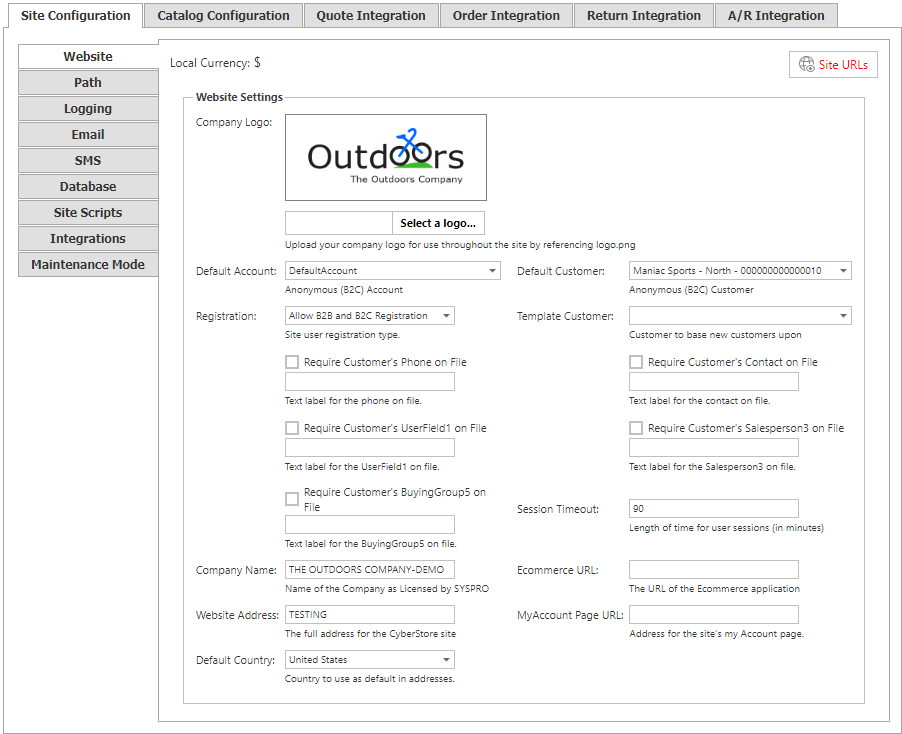
Site Manager changes take effect immediately. A confirmation mark appears next to the field being changed and disappears when the change is saved.
Site identity and addresses
| Setting | Description |
|---|---|
| Local Currency | The default currency established in SYSPRO. |
| Company Logo | Upload the company logo used wherever logo.png is referenced in the site’s theme. Select an image from the file system or drag it onto the logo box. |
| Company Name | The SYSPRO company name. It must match the company name in the CyberStore license. |
| Ecommerce URL | The URL for the CyberStore e-commerce application, for example http://www.yourDomain.com/ecommerce. |
| Website Address | The full domain address for the CyberStore website, for example http://www.yourDomain.com. |
| MyAccount URL | The full address of the CyberStore My Account page, for example /ecommerce/CustomerMyAccount.aspx. |
| Default Country | The country assumed by default for the site. |
Site URLs
Use Site URLs to configure the addresses for the selected site.

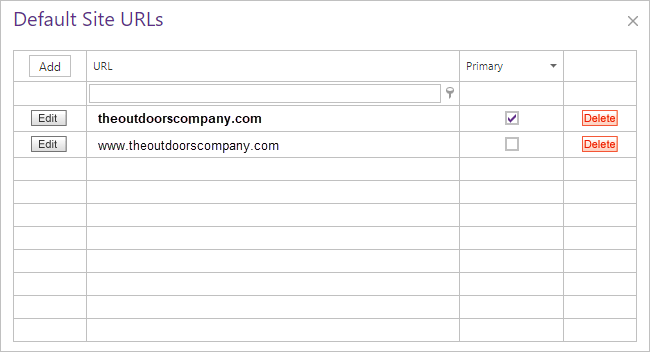
The Site URLs grid lists the URLs defined for the site. The primary URL is shown in bold and has the Primary check box selected.
- Each site must have at least one URL.
- Only one URL can be primary across all sites.
- A site with only one URL must use that URL as its primary URL.
- When you add the first URL for a site, CyberStore saves it as the primary URL.
- You can add URLs with Add or New, and edit or delete a selected URL.
- When you make a non-primary URL primary, the previous primary URL is demoted.
- A single URL cannot be changed from primary or deleted.
The primary URL determines the default site to load when a requested URL does not match a URL in the configured list.
Default accounts and customers
| Setting | Description |
|---|---|
| Default Account | The account used before a visitor signs in, also called the Anonymous User. It uses the Default Customer and cannot be deleted from CyberStore. |
| Default Customer | The SYSPRO customer used for B2C accounts. Its SYSPRO settings determine B2C pricing. Its price is also used as the Default Price for customers with different pricing, and its customer class determines item visibility through its View List. |
| Template Customer | The SYSPRO customer used as a template when creating new SYSPRO customers. Its settings are cloned to establish general properties for the new customer record. |
Registration and session behavior
The Registration section controls how visitors register for an account and, for B2B registration, how they link it to an on-file customer.
| Setting | Description |
|---|---|
| Registration type | Choose Allow B2B and B2C Registration, Allow Only B2B Registration, or Allow Only B2C Registration. |
| B2B verification fields | When B2B registration is allowed, visitors can link their account to an on-file customer using SYSPRO customer data. Customer Number is required; Customer’s On-File Phone, Customer’s Contact On-File, Customer’s Userfield1, Customer’s Salespersion3, and Customer’s BuyingGroup5 are optional. |
| Session Timeout | The number of inactive minutes before a visitor is logged out and items in the shopping cart are cleared. Closing the browser terminates the session even before the timeout. |