General Item Settings
Use the General tab to maintain a catalog item’s identity, type, display content, and category assignment.
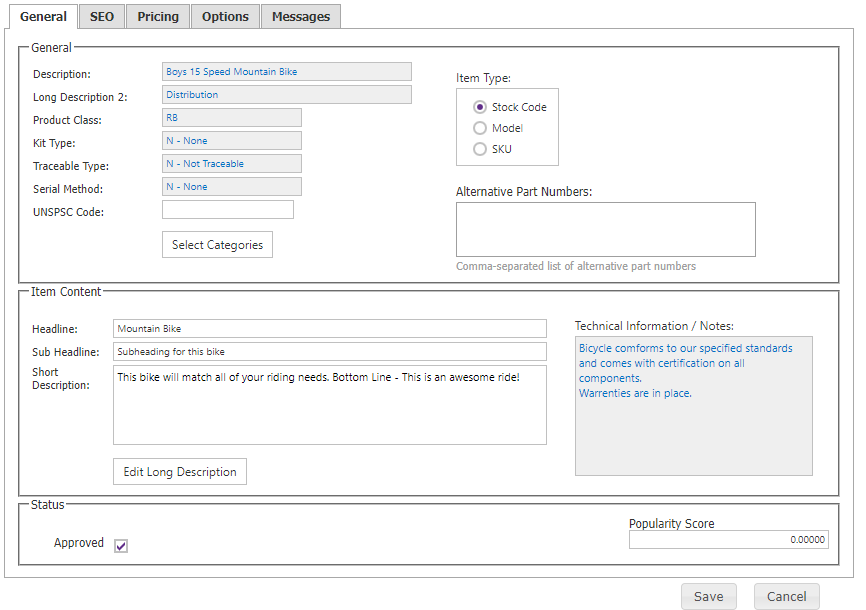
| Setting | Description |
|---|---|
| Description | SYSPRO description for a stock code; editable only for Models. |
| Long Description 2 | SYSPRO long description for a stock code; read-only. |
| Item Type | Stock Code, Model, or SKU. Converting a Model converts its related SKUs to Stock Codes after confirmation and save. |
| Alternative Part Numbers | Alternate references. Paste comma-separated values, type comma-space, or press Enter to add individual tokens. |
| Model | Model association for a SKU. |
| Headline, Sub Headline, Short Description | Catalog presentation content. |
| Long Description | Detailed content maintained in the HTML editor. |
| Approved | Controls whether the item appears in the online catalog. |
| Technical Information | Technical content displayed with the item. |
| Popularity Score | Relative item popularity. |
Use Select Categories to assign the item to categories. CyberStore supplies product class, kit type, traceability, serial method, and SYSPRO data; those fields are not edited here.