Capturing Customer Comments and Custom Data During Checkout
Overview
CyberStore provides customers with the ability to submit order-specific information during checkout, such as Special Instructions and Order Comments. These inputs are tightly integrated with SYSPRO, allowing customer-facing data to flow directly into relevant order fields. This guide explains the flow of these comments through the checkout and fulfillment process, highlights how they are stored in SYSPRO, and introduces advanced options like Custom Form Fields (CFF), Free Form Notes, and Order Line Comments for capturing additional structured or rich-text data.
In this Topic
- Entering Comments in CyberStore
- Reviewing Comments During Order Confirmation
- Viewing Comments After Order Completion
- Locating Comments in SYSPRO
- Editing Comments in SYSPRO
- Advanced Options for Capturing Checkout Data
Entering Comments in CyberStore
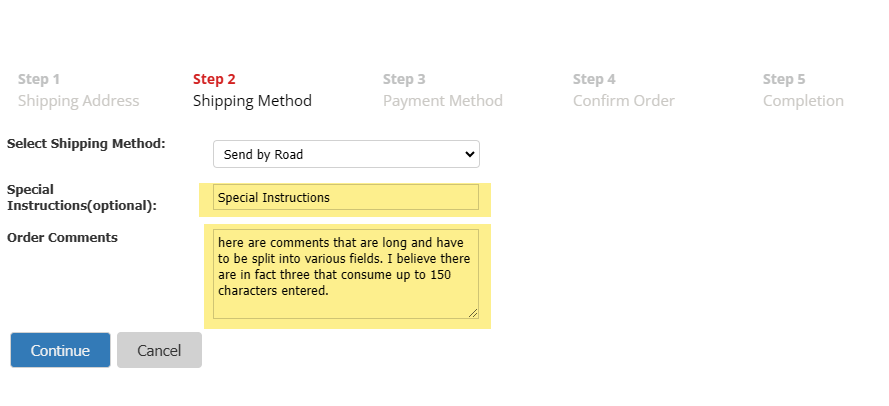 During the Step 2 - Shipping Method of checkout, customers can provide additional details using two fields:
- Special Instructions - A short free-text field.
- Order Comments - A longer comment field with a 150-character limit set by CyberStore to ensure compatibility with SYSPRO’s long comment fields. While SYSPRO technically supports up to 400 characters split into four lines of 100 characters each, CyberStore reserves part of this space to allow room for potential additional internal comments. If the input exceeds 100 characters, SYSPRO will automatically break it across multiple lines at appropriate points.
| Field | Description |
|---|---|
| Special Instructions | General delivery or packaging notes. |
| Order Comments | Broader commentary about the order, passed to SYSPRO long text fields. |
Note: Field input is optional but stored persistently through the order process.
Reviewing Comments During Order Confirmation
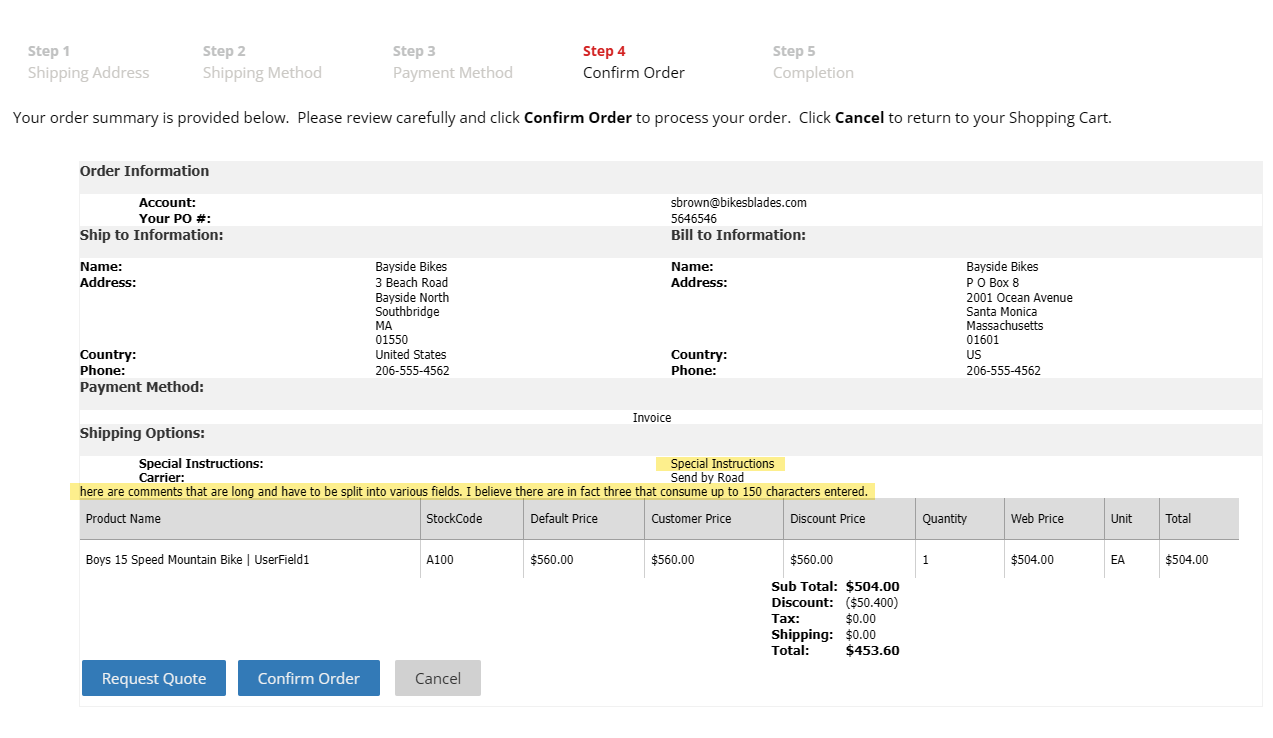 In Step 4 - Confirm Order, entered text is shown for review. This provides customers the opportunity to verify or update the comments before submission.
Viewing Comments After Order Completion
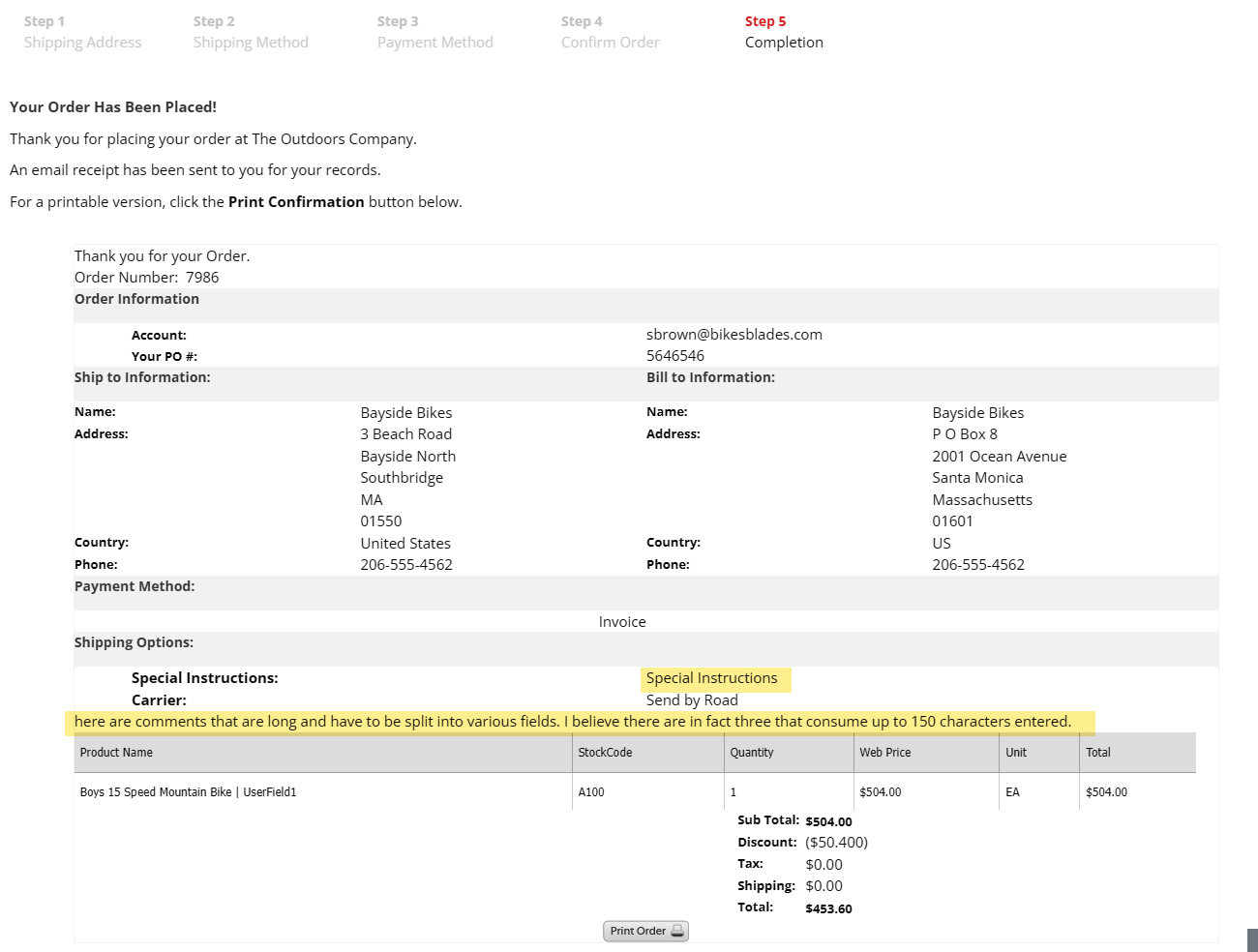 After checkout (Step 5 - Order Complete), both Special Instructions and Order Comments are visible:
- On the order Thank You page
- Within My Account > Order History > Order Details
- On the Order Receipt tab
Locating Comments in SYSPRO
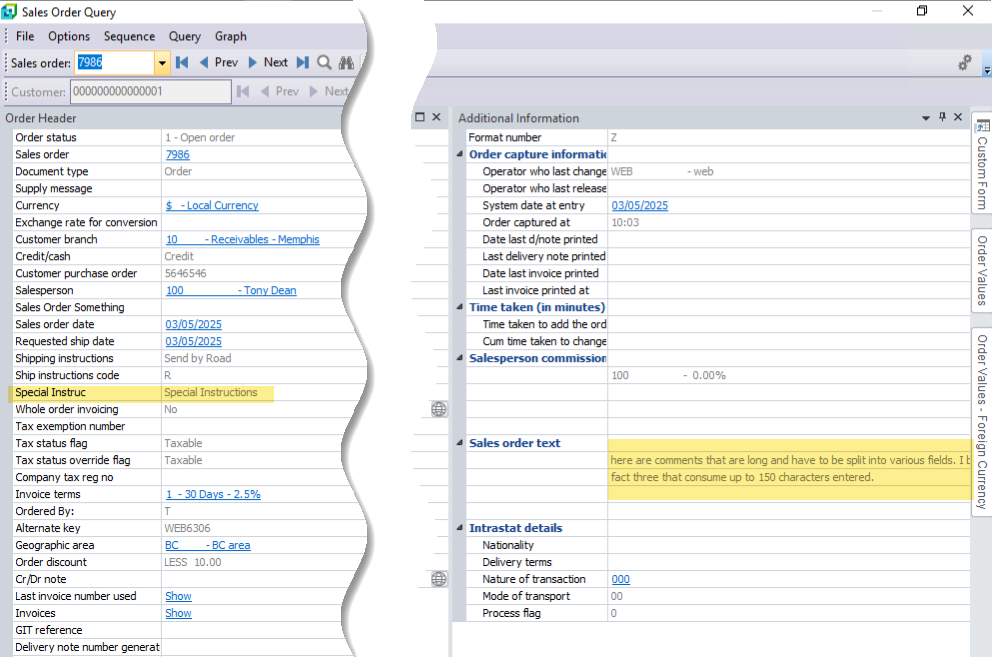 Once the order syncs with SYSPRO, comments are mapped as follows:
| CyberStore Field | SYSPRO Order Master Fields | e.Net Mapping Node |
|---|---|---|
| Special Instructions | ShippingInstrs | <ShippingInstrs> |
| Order Comments | sotext1, sotext2, sotext3 | <OrderComments> |
Note: Right-click on labels in SYSPRO to verify which fields are linked if comments are not visible.
Editing Comments in SYSPRO
Order comments are not editable in the Sales Order Maintenance screen directly. Instead:
- Open the order in Sales Order Maintenance.
- Proceed to the End Order popup.
- Update comment fields.
- Save changes before exiting.
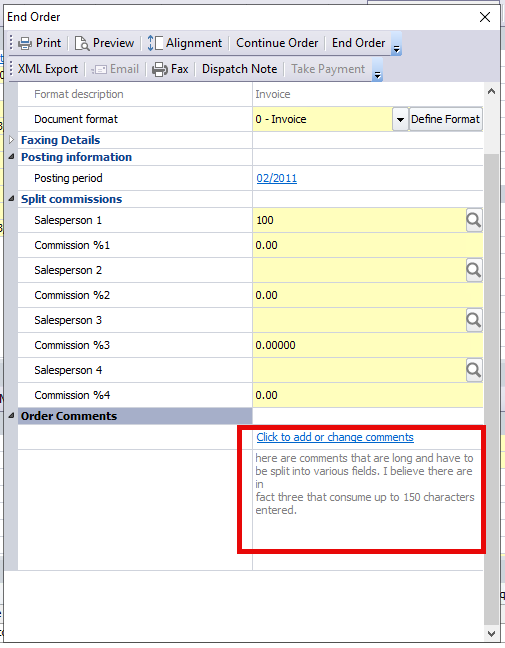
Note: If the End Order dialog is not completed, edits to comment fields may not be saved.
Advanced Options for Capturing Checkout Data
Overview
CyberStore is designed to work seamlessly with SYSPRO via the SYSPRO e.net API, supporting a wide range of common and advanced use cases. While not all functions available in the SYSPRO UI are exposed through e.net objects, the fields available in CyberStore have been intentionally chosen to meet the needs of most business processes. For organizations with specialized requirements, CyberStore’s extensible architecture provides rich integration opportunities, allowing developers to build support for advanced data flows such as Custom Form Fields, Free Form Notes, and order line-level comments. This flexibility ensures that even non-standard use cases can be addressed effectively within the platform.
Organizations that require more structured data entry… during checkout-beyond free-text instructions-can extend CyberStore to support integration with SYSPRO Custom Form Fields (CFF), Free Form Notes, and Order Line Comments. These approaches allow more granular, purpose-built data to be passed to SYSPRO, enhancing order detail and business process alignment.
In this Topic
- Custom Form Fields (CFF)
- Free Form Notes Integration
- Order Line Comments
- Implementation Requirements
Custom Form Fields (CFF)
Custom Form Fields (CFF) allow businesses to define additional fields in SYSPRO for capturing user-specific data. CyberStore can be extended to:
- Add custom input fields to checkout.
- Capture data and map it directly to CFFs via SYSPRO e.net.
Use Cases
- Job or cost center tracking
- Customer compliance or certifications
- Product-specific requirements
Note: These fields do not exist by default and must be created and managed within SYSPRO prior to CyberStore integration.
For details about using Custom Form Fields during checkout, see the Sales Order Custom Form Field Customization Guide.
Free Form Notes Integration
Free Form Notes are ideal for unstructured or supplementary information. With proper configuration:
- Inputs can be added to checkout pages.
- Notes are automatically generated and attached to the order in SYSPRO.
Use Cases
- Internal order routing notes
- Customer-specific fulfillment details
- Packaging or shipping preferences
Order Line Comments
CyberStore supports the ability to pass order line-specific comments through to SYSPRO using advanced configuration methods. These allow for unique notes to be attached at the line item level rather than at the order header level.
Note: While order line comments are supported, CyberStore does not currently support writing to order header-level comment fields in SYSPRO.
Use Cases
- Product-specific shipping or handling instructions
- Custom engraving, labeling, or configuration notes
- Line-by-line internal notes for fulfillment
Implementation Requirements
To implement CFF, Free Form Note, or Order Line Comment integration:
| Requirement | Description |
|---|---|
| Custom Web Development | Required to add new fields to checkout and validate inputs. |
| API Integration | Must use SYSPRO e.net to post values to appropriate objects. |
| Mapping Logic | Field mappings and error-handling routines must be configured. |
Note: These features are supported but not enabled by default. They require collaboration between a CyberStore web developer and a SYSPRO administrator.