CheckOutRePrintOrderConfirmation
CheckOutRePrintOrderConfirmation displays a printable copy of a completed web order in Order Lookup Review.
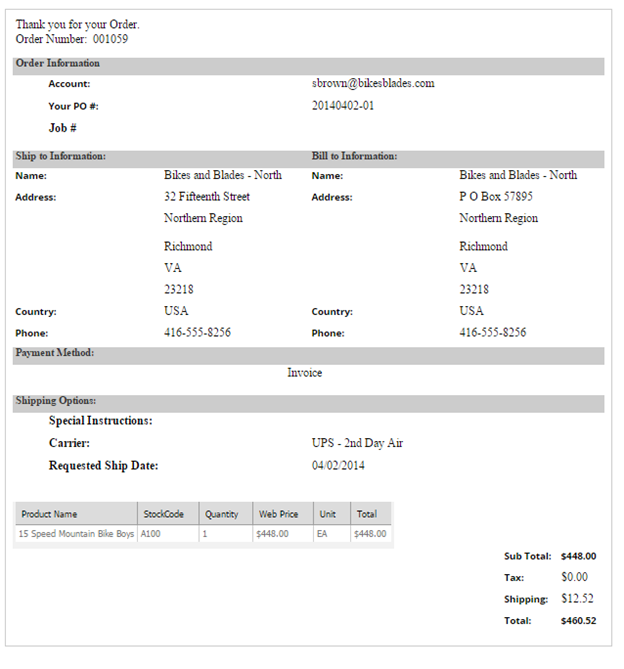
Reprint behavior
The control presents the order details as they were at submission time so a shopper can reprint an order confirmation. It uses CheckOutOrderDisplayControl for the order summary.
The reprinted confirmation is not tied to the current order status in SYSPRO. Direct shoppers to Order Lookup History for the current status and any later changes to item details or comments.
Configurable properties
| Property | Default | Valid values or format | Effect |
|---|---|---|---|
CustomShippingMessageString | Not specified | Sets a message that describes custom shipping. | |
OrderDisplayNameString | Not specified | Sets the order-display name. |
SitePages.config example
The following example loads CheckOutRePrintOrderConfirmation.ascx and applies the documented literal defaults. The following properties are omitted because they do not have documented literal defaults: CustomShippingMessage, OrderDisplayName.
<Control src="CheckOutRePrintOrderConfirmation.ascx" />
Add this <Control> element to the appropriate page placeholder as described in The SitePages.config File.
Inherited properties
CheckOutRePrintOrderConfirmation inherits shared visibility and shopper-access conditions from CyberStoreBaseControl.
Validate the control
- Locate a completed test order in Order Lookup Review.
- Confirm the printable confirmation matches the order details captured at submission.
- Confirm the configured order display name and custom shipping message.
- Compare the reprint with current Order Lookup History when the order has changed, and confirm current-status information is obtained from the history view.