CatalogCategorySearchListControl
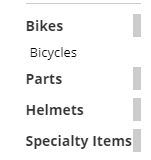
CatalogCategorySearchListControl displays sibling categories with their item counts, including items in subcategories. It shows only categories that contain items and are approved for the current shopper’s View List.
Configurable properties
| Property | Default | Valid values or format | Effect |
|---|---|---|---|
CurrentCatDescriptionString | Empty string ("") | Sets the current category description. | |
CurrentCatHeadlineString | Empty string ("") | Sets the current category headline. | |
PhotoWidthInteger | 0 | Sets the category photo width. | |
ShowCategoryItemCountBoolean | false | true, false | Controls display of the category item count. |
ShowTopLevelCategoriesBoolean | false | true, false | Controls display of top-level categories. |
SitePages.config example
The following example loads CatalogCategorySearchListControl.ascx and applies the documented literal defaults. The following properties are omitted because they do not have documented literal defaults: CurrentCatDescription, CurrentCatHeadline.
<Control src="CatalogCategorySearchListControl.ascx"
         PhotoWidth="0"
         ShowCategoryItemCount="false"
         ShowTopLevelCategories="false" />
Add this <Control> element to the appropriate page placeholder as described in The SitePages.config File.
Inherited properties
CatalogCategorySearchListControl inherits listing behavior from ListingControl and shared conditions from CyberStoreBaseControl.