File_FileUploader Widget
The File_FileUploader widget adds a configurable file-upload control to a page. It supports file-type and size restrictions, optional multiple-file selection, labels, and an optional drag-and-drop area.
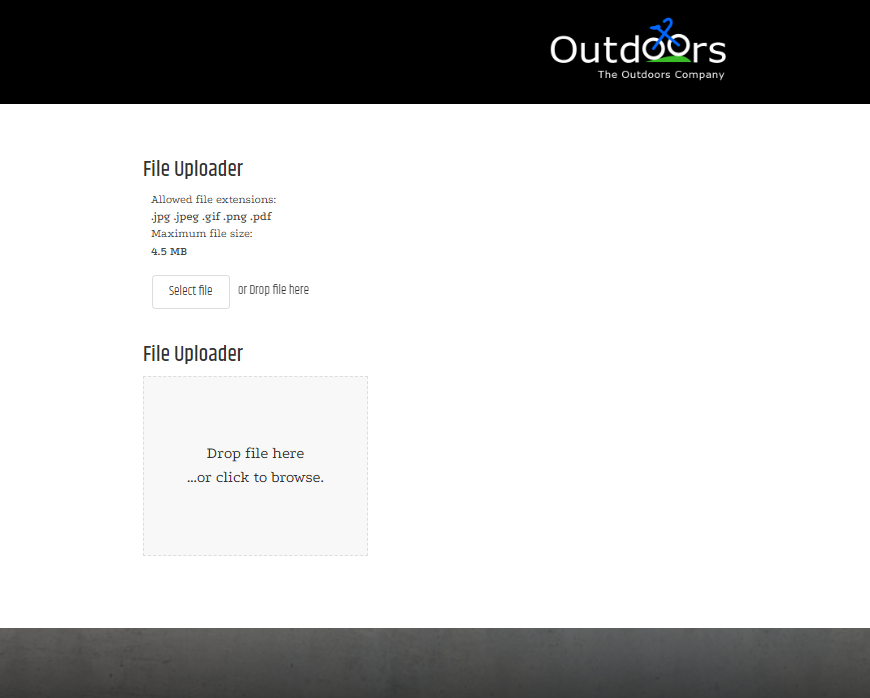
Add the widget to a page
<Control src="LoadWidgetControl.ascx"
    FileLocation="File_FileUploader.html"
    Options="allowMultipleFiles: false,
        allowedExtensionsForUpload: '.pdf',
        maxFileSize: 4500000,
        uploadMode: 'useButton'" />
Choose the smallest file-type and size allowance that supports the page workflow. Do not rely on client-side restrictions as the only protection for uploaded files. The server independently applies the validation described in File Upload Security.
Widget options
| Option | Default | Valid values or format | Effect |
|---|---|---|---|
allowMultipleFilesBoolean | Not specified | true, false | Allows a shopper to select one or multiple files. |
allowedExtensionsForUploadString | Not specified | File-extension list | Sets the permitted file extensions. |
maxFileSizeNumber | Not specified | File size | Sets the maximum upload size. |
displayRulesBoolean | Not specified | true, false | Shows or hides the allowed extensions and maximum size. |
labelString | Not specified | Text | Sets the uploader label. |
allowDragAndDropZoneBoolean | Not specified | true, false | Shows or hides a drag-and-drop upload area. |
strObscureFilenameBoolean | Not specified | true, false | Saves uploaded files with randomly generated names. |
filePrefixString | Not specified | Text | Adds a prefix to the saved file name. |
fileSuffixString | Not specified | Text | Adds a suffix to the saved file name. |
uploadModeString | Not specified | 'instantly', 'useButton' | Controls when the upload starts. |
Validate file uploads
- Upload an allowed test file that is smaller than the configured size limit.
- Attempt an unsupported file type and an oversized file; confirm both are rejected.
- Test the configured multiple-file and drag-and-drop behavior.
- Confirm uploaded files are available only to authorized users of the page workflow.
- Test that the selected files also meet the server-side file-upload rules.