ATP Update
Use the ATP Update Operation to refresh the Available to Promise (ATP) information that CyberStore stores from SYSPRO. The Command is ATPUpdate.
Because ATP calculation is not performed interactively for each shopper request, scheduled updates keep the stored projections current for delivery commitments. The Operation can also create a report of the refreshed ATP data.
Configure the Operation
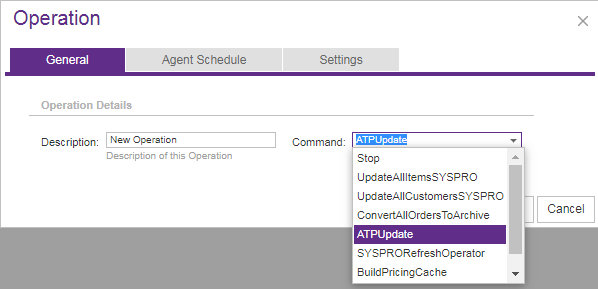
Open Tools > Operation Center and select Add. On the General tab, enter a meaningful description and choose the ATPUpdate Command.
Use Agent Schedule to run the Operation immediately or at a specified date and time. A recurring schedule is appropriate when ATP projections must remain current as supply and demand change.
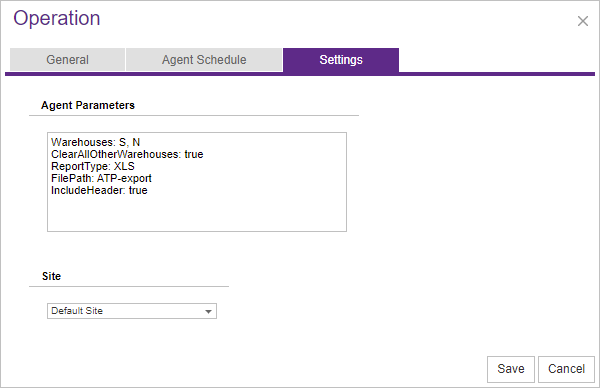
On Settings, select the Site and add any warehouse or report parameters required for the run.
Set the scope and report options
All parameters are optional and can be combined. Enter each parameter on its own line in Agent Parameters.
| Parameter | Purpose | Accepted values and defaults |
|---|---|---|
Warehouses | Limits the refresh to specified SYSPRO warehouses. | Comma-separated warehouse codes. |
ClearAllOtherWarehouses | Clears stored ATP records for warehouses that are no longer in SYSPRO or are outside the Warehouses list. | Boolean value. Use only when excluded warehouse data should be removed. |
ReportType | Selects the output format for the ATP report. | csv, xls, xlsx, or json. An omitted or unrecognized value defaults to csv. |
FilePath | Selects the report destination and can include a file name. | A directory path with an optional file name. When omitted, the report is written to the Exports directory. |
IncludeHeader | Controls whether the report includes column headings. | Boolean value; defaults to true when omitted. |
The report includes ATP data calculated for a shipping date of the next business day, Monday through Friday, and groups results by Item Category.
ClearAllOtherWarehousesremoves stored ATP data outside the selected scope. Verify theWarehouseslist before enabling it.
What happens during processing
CyberStore retrieves ATP information from SYSPRO for the selected warehouses and replaces the corresponding stored projections. If report parameters are present, it also creates the requested output using the refreshed ATP data.
Review the result
After the Operation finishes, review its Summary and Message details in Operation History. If a report was requested, verify that the file was created in the configured location and that the expected warehouses and Item Categories are represented.