FilterControl
FilterControl provides dynamic catalog characteristic filters for supported listing controls. The legacy source identifies use with CatalogItemTileListingControl and DataDisplayControl.
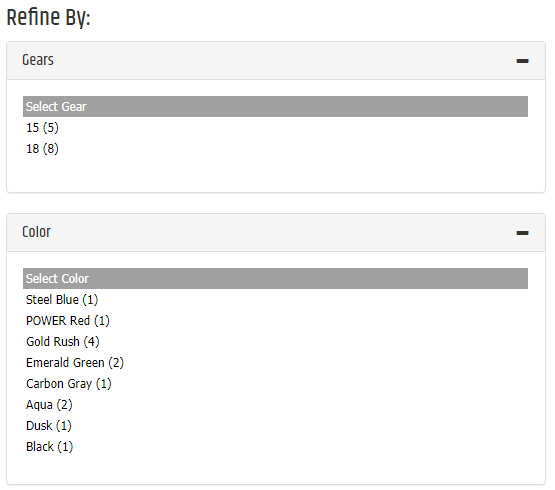
Filter availability
A filter appears only when at least two options are available. Use MinimumToShow to configure the threshold.
The legacy source warns that dynamic filtering can return fewer than the configured number of unique results. Test the configured listing and hide the filter when it does not provide useful choices.
Configurable properties
| Property | Default | Valid values or format | Effect |
|---|---|---|---|
MinimumToShowInteger | Not specified | Sets the minimum available options required to display a filter. | |
FilterTypeString | Not specified | Sets the rendering mode for characteristic-type colors. | |
DataControlIDString | Not specified | Sets the associated data control identifier. | |
HeaderTextString | Not specified | Sets the filter header text. | |
HideOnEmptyBoolean | Not specified | true, false | Controls whether the filter is hidden when no values are available. |
IsFilteringBoolean | Not specified | true, false | Indicates whether filtering is active. |
ItemCountFormatString | Not specified | Sets the item-count display format. | |
SelectionTextString | Not specified | Sets the selection text. | |
ShowItemCountBoolean | Not specified | true, false | Controls whether item counts appear. |
TextFieldString | Not specified | Sets the field used for filter text. | |
ColorTileClearFilterTextString | Not specified | Sets the clear-filter text for color tiles. | |
ColorTileCSSClassString | Not specified | Sets the color-tile CSS class. | |
ColorTileHeaderCSSClassString | Not specified | Sets the color-tile header CSS class. | |
ColorTilePanelCSSClassString | Not specified | Sets the color-tile panel CSS class. | |
ColorTileHeightInteger | Not specified | Sets the color-tile height. | |
ColorTileWidthInteger | Not specified | Sets the color-tile width. | |
ListClearFilterTextString | Not specified | Sets the clear-filter text for list rendering. |
SitePages.config example
The following example loads FilterControl.ascx and applies the documented literal defaults. The following properties are omitted because they do not have documented literal defaults: MinimumToShow, FilterType, DataControlID, HeaderText, HideOnEmpty, IsFiltering, ItemCountFormat, SelectionText, ShowItemCount, TextField, ColorTileClearFilterText, ColorTileCSSClass, ColorTileHeaderCSSClass, ColorTilePanelCSSClass, ColorTileHeight, ColorTileWidth, ListClearFilterText.
<Control src="FilterControl.ascx" />
Add this <Control> element to the appropriate page placeholder as described in The SitePages.config File.
Color filter modes
For characteristic-type colors, FilterType supports the following rendering modes.
| Filter type | Behavior |
|---|---|
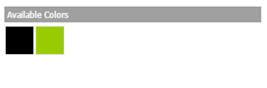
ColorTiles | Displays selectable color blocks without the HTML color value or item count. |
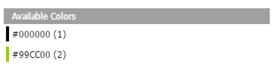
ColorList | Displays the color in a standard list with the HTML color value. |
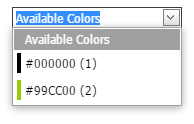
ColorDropDown | Displays the color in a standard drop-down with the HTML color value. |
Inherited properties
FilterControl inherits shared visibility and shopper-access conditions from CyberStoreBaseControl.
Validate the control
- Configure a supported listing control with filterable characteristics.
- Confirm the filter is hidden below the configured minimum option threshold.
- Test each configured color filter mode.
- Confirm the resulting listing remains useful when multiple filters are applied.