PunchOut Order Intake
PunchOut order intake handles order cXML sent from the Customer’s external procurement application back into CyberStore. This is distinct from returning a shopping cart at the end of the catalog session: the intake message represents the procurement system’s order request.
Transform incoming order cXML
Open Customers > Customer Maintenance, edit the Customer, and use Settings > Punch Out Options > Order Intake Settings to select the custom XSLT used for incoming order cXML.
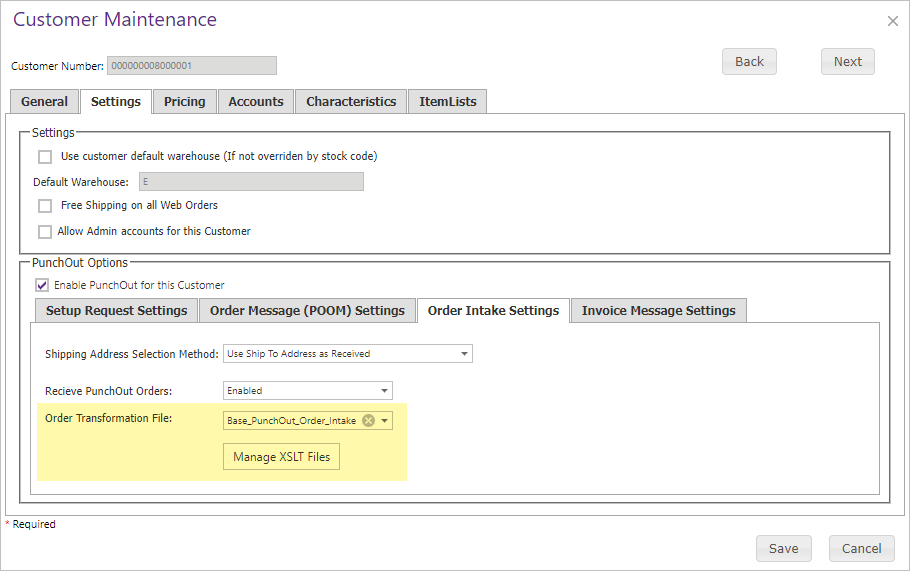
The transformation maps the procurement system’s document into the structure CyberStore expects for order processing. Configure and test it for the sending system before treating the relationship as production-ready.
Accept an order for a Child Customer
A Parent Customer can optionally submit a PunchOut order intended for one of its Child Customers. This requires an established Parent/Child Customer relationship and the applicable PunchOut settings.
The Parent identifies the Child Customer through a value placed in the incoming Freight Description. The configured XSLT transforms the data so the order is written to SYSPRO for that Child Customer. CyberStore then detects that the SYSPRO order belongs to a Customer other than the Parent, verifies the Parent/Child relationship, and records the CyberStore order for the Child Customer.
Because this behavior changes which Customer owns the resulting order, validate the relationship, lookup value, XSLT mapping, and resulting SYSPRO Customer before enabling it for live requests.
Validate disabled-Customer handling
PunchOut must be enabled for the Customer represented by the request. When the gateway receives a request for a Customer without PunchOut enabled, CyberStore reports: “Punch Out is not enabled for the Customer specified.” and returns an error status.