CatalogCategoryDiagramListing
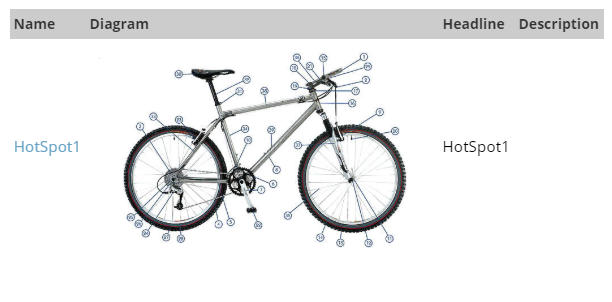
CatalogCategoryDiagramListing displays Hot Spot diagrams for catalog items that have them enabled. It was introduced in v2.5.
Configurable properties
| Property | Default | Valid values or format | Effect |
|---|---|---|---|
HotSpotDiagramEmptyDisplayBoolean | false | true, false | Controls whether the diagram listing is displayed when no data is available. |
HotSpotDiagramFolderLocationString | "~/CatalogHotSpot.aspx" | Sets the Hot Spot diagram folder location. | |
HotSpotDiagramGridAlwaysDisplayPagerBoolean | false | true, false | Controls whether the grid pager is displayed when there are fewer than two pages. |
HotSpotDiagramGridDisplayBoolean | true | true, false | Selects whether the listing uses the grid or data-list display. |
HotSpotDiagramGridDisplayDescriptionColumnBoolean | true | true, false | Controls the grid description column. |
HotSpotDiagramGridDisplayDescriptionHeaderString | "Description" | Sets the grid description-column header. | |
HotSpotDiagramGridDisplayDiagramColumnBoolean | true | true, false | Controls the grid diagram-image column. |
HotSpotDiagramGridDisplayDiagramHeaderString | "Diagram" | Sets the grid diagram-image header. | |
HotSpotDiagramGridDisplayHeadersBoolean | true | true, false | Controls grid header display. |
HotSpotDiagramGridDisplayHeadlineColumnBoolean | true | true, false | Controls the grid headline column. |
HotSpotDiagramGridDisplayHeadlineHeaderString | "Head Line" | Sets the grid headline-column header. | |
HotSpotDiagramGridDisplayNameColumnBoolean | true | true, false | Controls the grid diagram-name column. |
HotSpotDiagramGridDisplayNameHeaderString | "Name" | Sets the grid diagram-name header. | |
HotSpotDiagramGridPageSizeInteger | ITM_CatalogListingPageSize or 10 | Sets the Hot Spot diagram grid page size. | |
HotSpotDiagramListColumnsInteger | 2 | Sets the number of columns in the data-list layout. | |
HotSpotDiagramListGridLinesString | "None" | Sets grid lines for the data-list layout. | |
HotSpotDiagramListRepeatDirectionString | "Horizontal" | Sets the data-list repeat direction. | |
HotSpotDiagramListRepeatLayoutString | Not specified | Sets the data-list layout type. | |
HotSpotDiagramNoDataMessageString | "Sorry, there are no Diagrams associated with this Item." | Sets the message shown when no diagram data is available. | |
HotSpotDiagramPhotoWidthInteger | 100 | Sets the diagram photo width. | |
HotSpotDiagramURLString | "~/CatalogHotSpot.aspx" | Sets the link URL for a Catalog Hot Spot. |
SitePages.config example
The following example loads CatalogCategoryDiagramListing.ascx and applies the documented literal defaults. The following properties are omitted because they do not have documented literal defaults: HotSpotDiagramListRepeatLayout.
<Control src="CatalogCategoryDiagramListing.ascx"
         HotSpotDiagramEmptyDisplay="false"
         HotSpotDiagramFolderLocation="~/CatalogHotSpot.aspx"
         HotSpotDiagramGridAlwaysDisplayPager="false"
         HotSpotDiagramGridDisplay="true"
         HotSpotDiagramGridDisplayDescriptionColumn="true"
         HotSpotDiagramGridDisplayDescriptionHeader="Description"
         HotSpotDiagramGridDisplayDiagramColumn="true"
         HotSpotDiagramGridDisplayDiagramHeader="Diagram"
         HotSpotDiagramGridDisplayHeaders="true"
         HotSpotDiagramGridDisplayHeadlineColumn="true"
         HotSpotDiagramGridDisplayHeadlineHeader="Head Line"
         HotSpotDiagramGridDisplayNameColumn="true"
         HotSpotDiagramGridDisplayNameHeader="Name"
         HotSpotDiagramGridPageSize="ITM_CatalogListingPageSize` or `10"
         HotSpotDiagramListColumns="2"
         HotSpotDiagramListGridLines="None"
         HotSpotDiagramListRepeatDirection="Horizontal"
         HotSpotDiagramNoDataMessage="Sorry, there are no Diagrams associated with this Item."
         HotSpotDiagramPhotoWidth="100"
         HotSpotDiagramURL="~/CatalogHotSpot.aspx" />
Add this <Control> element to the appropriate page placeholder as described in The SitePages.config File.
Inherited properties
CatalogCategoryDiagramListing inherits listing behavior from ListingControl and shared conditions from CyberStoreBaseControl.