Address Mapping
Address Mapping tells CyberStore where structured address elements—street lines, city, state, postal code, and country—are stored in flexible SYSPRO Customer address fields. A correct map allows imported billing and shipping addresses to be used without manually re-entering each Customer address.
Prepare the source data
Review several representative Customers in SYSPRO before configuring a map. The same address element should use the same source field and sequence across Customer records. If one Customer stores postal code with city and state while another stores it on a separate line, a single map cannot interpret both consistently.
SYSPRO address fields and labels vary by installed version and company configuration. Use the actual labels and field order in the applicable environment rather than assuming a standard postal layout.
Configure the map
Most sites need one map, named Base Mapping by default. The Address Mapping screen pairs each CyberStore destination with the field and parsing rule used in SYSPRO.
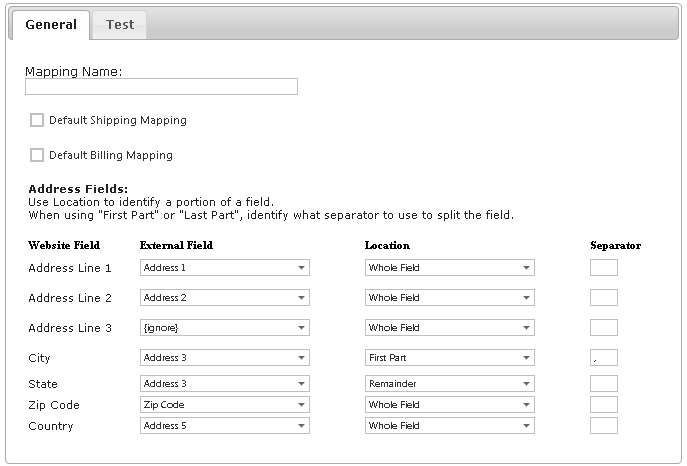
| Column | Purpose |
|---|---|
| Website Field | CyberStore destination, including Address Lines 1–3, City, State, Zip Code, and Country. |
| External Field | SYSPRO address field containing the destination value. Select {ignore} when CyberStore does not use that destination. |
| Location | Selects the entire source field, its first part, or the remainder when more than one address element shares a line. |
| Separator | Character that divides elements sharing a source field, such as a comma or space. |
Map a combined city and state
Consider this Customer address:
40 Southbridge St.
Ste. 210
Worcester, MA
01608
USA
If SYSPRO stores Worcester, MA in Address Line 3, configure two destination rows:
| Website Field | External Field | Location | Separator |
|---|---|---|---|
| City | Address 3 | First Part | , |
| State | Address 3 | Remainder | , |
Map the street, suite, postal code, and country to their corresponding source fields. Use {ignore} only for a CyberStore destination that is intentionally absent from the SYSPRO format.
Validate the result
Test more than one Customer and include addresses with suites, combined city/state lines, long values, and different countries. Confirm that billing and shipping addresses display correctly and that separators are not retained as part of the mapped value.
Correct mapping cannot compensate for inconsistent source data. Standardize the SYSPRO address layout before relying on one mapping across the Customer base.