WCF Service Configuration
Configure the SYSPRO WCF service, then enter its address in CyberStore.
Connect CyberStore
- Open SYSPRO Configuration in the CyberStore Management Console.
- In Connection Method, select Windows Communication Foundation (net tcp).
-
Enter the address using this format:
[SYSPRO_SERVER]:[SOAP_PORT]/[BASE_ADDRESS] - Save the connection settings.
For a service using the legacy default SOAP port and base address, the address format is [SYSPRO_SERVER]:20000/SYSPROWCFService.
Service configuration file
The default service configuration file is SYSPROWCFHostService.exe.config in the SYSPRO WCF Service installation directory. The following settings control the connector behavior:
| Setting | Purpose |
|---|---|
Language | Default language for SYSPRO communication. |
LogDetail | Default SYSPRO log-detail level. |
Instance | Default SYSPRO instance. |
baseaddress | Template base address for the service. |
DetailedLog | Enables detailed service logging when set to true. |
servicesoapbinding | Binding used for SOAP communication. |
servicerestport | REST endpoint port. |
servicesoapport | SOAP endpoint port. |
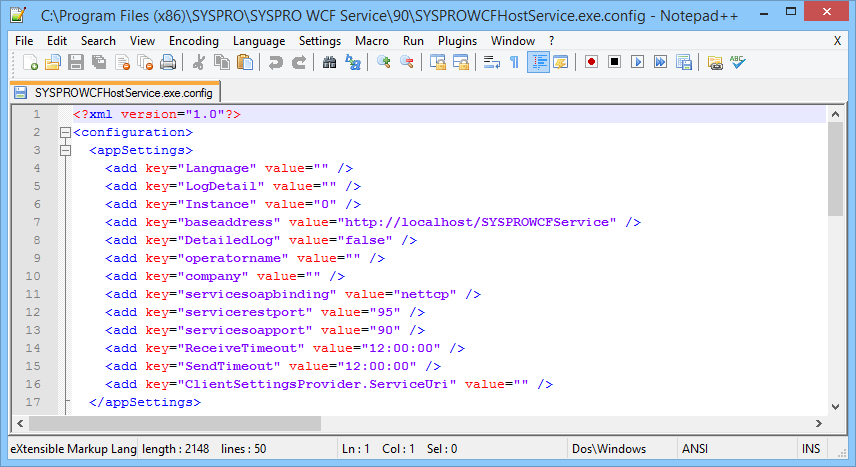
Restart the SYSPRO WCF Service after changing its configuration file.
Service status and endpoint errors
Use the Windows Services management tool to start or restart SYSPRO WCF Service. Review the SYSPROWCF entry under Applications and Services Logs in Event Viewer for service-start details.
If CyberStore reports that no endpoint is listening, compare the configured server, SOAP port, and base-address values with the running service configuration.