Logging Settings
Use the Logging tab in Site Manager > Site Configuration to configure the site’s error presentation and diagnostic logging.
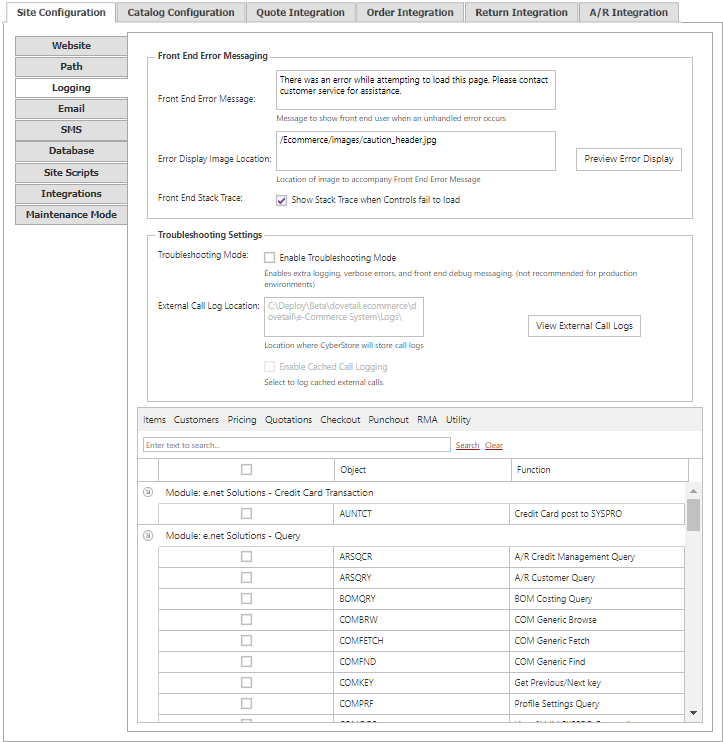
Stack traces, troubleshooting mode, and external-call debugging are diagnostic tools. Do not enable them in a production environment unless they are required for a time-limited investigation.
Front-end error presentation
| Setting | Description |
|---|---|
| Front End-Error Message | Text displayed to site visitors when an unhandled CyberStore exception occurs. It is shown whether or not front-end stack traces are enabled. |
| Error Display Image Location | URL of an image to include with the front-end error message. Use Preview Error Display to review the result. |
| Front-End Stack Trace | Displays detailed technical information for unhandled exceptions on the front end. It is disabled by default. |
Troubleshooting and external-call logs
| Setting | Description |
|---|---|
| Enable Troubleshooting Mode | Enables services such as external-call logging, verbose errors, and front-end debugging messages. This must be enabled before external-call logs can be written. |
| External Call Log Location | File-system folder in which external-call logs are stored. |
| External Call Log Mode | Controls logging of external calls, including calls cached in memory. |
| External Call Debugging Logs | Selects the functional areas whose external calls are logged. |
The external-call list is grouped by module and includes a short description for each call. Use the toolbar to select CyberStore components, such as Items, Customers, Pricing, Quotations, Punchout, Checkout, RMA, and Utility. The grid search filters the list by object name or description.
Payment-transaction requests and responses omit personal credit-card numbers from the generated log files. Troubleshooting mode must remain enabled for selected functional-area logs to be written.
Site Manager changes take effect immediately. A confirmation mark appears next to the changed field and disappears when the change is saved.