Cart_SaveCartPopup Widget
The Cart_SaveCartPopup widget lets a shopper name a saved cart. It is loaded automatically by the Shopping Cart control when the shopper chooses Save Cart.
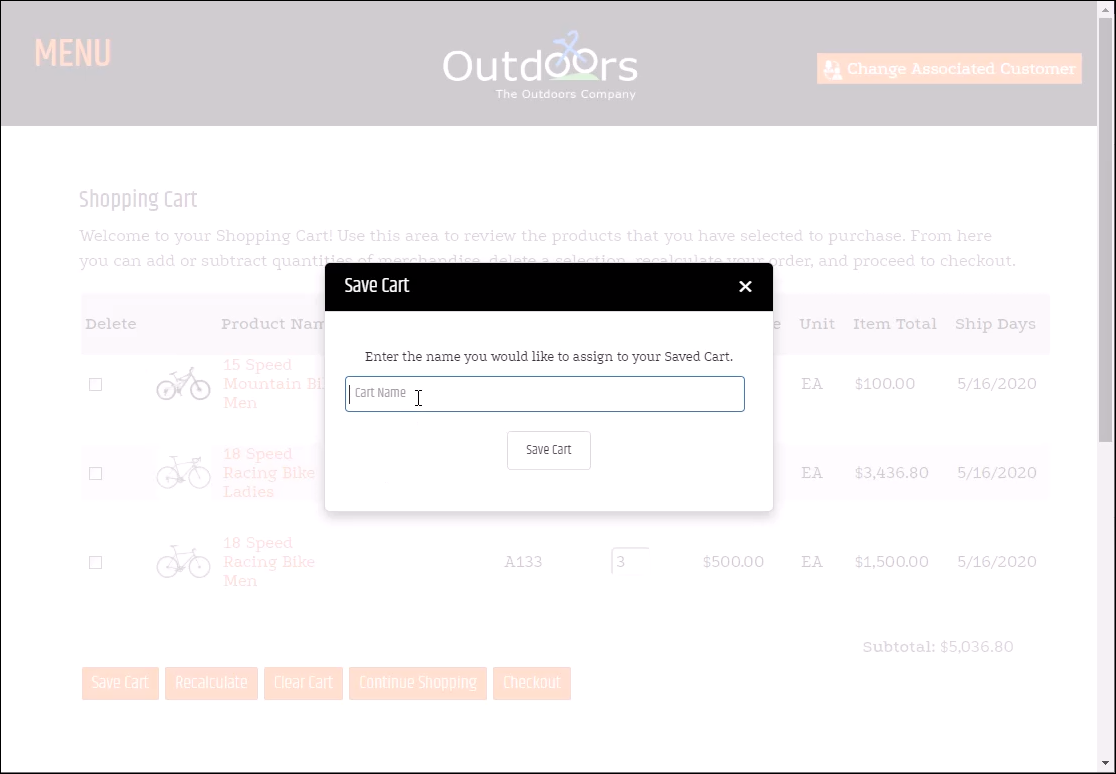
Save a cart
The dialog asks the shopper for a cart name, saves the name with the cart details, and returns the shopper to the Shopping Cart page. The name can contain any characters and is limited to 50 characters.
Widget options
Use the following options to control the dialog text and dimensions.
| Option | Default | Valid values or format | Effect |
|---|---|---|---|
popupTitleString | 'Save Cart' | Text | Sets the dialog title. |
popupWidthNumber | 450 | Pixels | Sets the dialog width. |
popupHeightNumber | 250 | Pixels | Sets the dialog height. |
nameFieldWidthNumber | 400 | Pixels | Sets the width of the cart-name field. |
instructionTextString | 'Enter the name you would like to assign to your Saved Cart.' | Text | Sets the instruction displayed above the cart-name field. |
For the cart rules that apply after a shopper saves or restores cart contents, see Shopping Cart Logic.
Validate the dialog
- Open the Shopping Cart page and select Save Cart.
- Confirm the dialog displays the configured title, instruction, and dimensions.
- Save a cart using a 50-character name.
- Confirm the saved cart is available when the shopper returns to the Shopping Cart page.