Shopping Cart Logic
The CyberStore cart coordinates price, inventory, product-access, and checkout rules. It recalculates whenever its contents or lifecycle changes so that an item accepted earlier is not automatically assumed to remain valid.
Account and session behavior
A registered Account uses one active cart across concurrent sessions. Changes made in one browser, device, or session are reflected in the other active sessions using the same login; one Account cannot maintain separate active carts in parallel.
Anonymous cart contents do not persist after the session ends. Session Timeout ends an inactive session and clears its active cart state. For a registered Account, CyberStore can retain that cart as an abandoned cart and restore it after the next successful sign-in. Configure the timeout in Website Settings.
Abandoned carts
An inactive registered cart can be tracked as an Abandoned Cart. Abandoned-cart quantities do not reduce inventory availability for other shoppers.
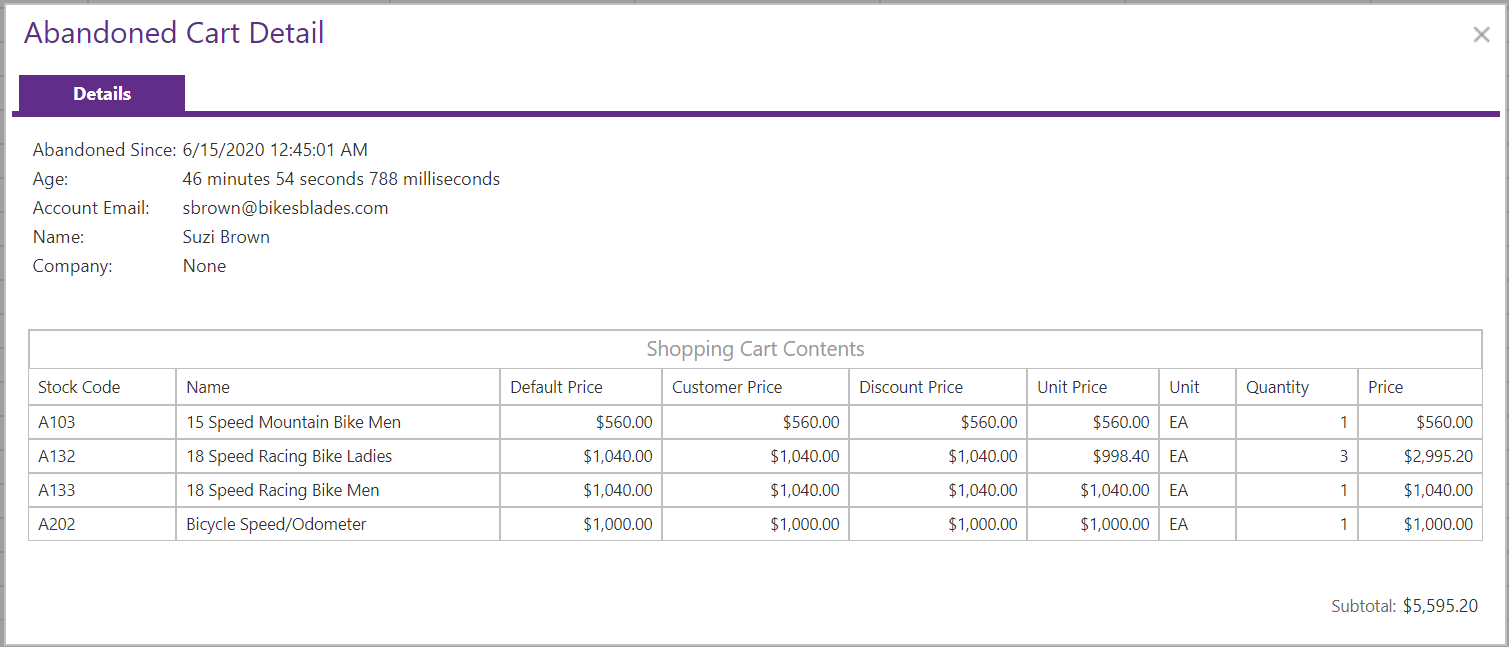
Whenever CyberStore restores retained cart contents, it recalculates every line using current data. A line is removed when the item:
- Has been unapproved.
- No longer belongs to a category in the active Customer or Account View List.
- Belongs only to a category whose View List rule disables Add to Cart.
- Has been removed from CyberStore.
Current pricing, quantity, UOM, and other cart rules are also reapplied during restoration.
Checkout locking
When a shopper begins checkout, CyberStore locks the Account’s cart. No active session using that Account can add, remove, or change lines, restore another cart, submit Quick Order items, or continue the same checkout independently.
CyberStore displays this message when another cart action is attempted:
The cart is currently unavailable while your account is in the process of checking out. Please complete or cancel the in progress order and try again later.
The lock remains until one of these events occurs:
- The order is completed.
- The shopper cancels the in-progress order.
- The lock reaches the configured Session Timeout.
The session that started checkout can cancel from checkout or the cart. Another active session using the same Account can cancel only from the cart. Cancellation deletes pending checkout information, restores the cart lines present when checkout began, removes the lock, and re-enables cart editing.
Cart item count
The cart item count is the sum of the quantities on all cart lines, not the number of distinct stock codes. A cart with quantity 2 on one line and quantity 3 on another has an item count of 5.
Recalculation triggers
CyberStore recalculates the cart when:
- Retained or abandoned contents are restored.
- A line is added.
- A line’s item, UOM, quantity, or other supported value is updated.
- A line is deleted.
- A cart or inventory operation changes contents programmatically.
Recalculation checks
During recalculation, CyberStore:
- Confirms unit pricing.
- Recalculates extended pricing, including quantity discounts.
- Recalculates surcharge lines.
- Checks inventory for items that cannot be back-ordered.
- Removes items disallowed by the active View List.
- Removes lines with zero quantity.
- Removes lines below an applicable minimum quantity.
- Removes zero-price lines unless zero-price cart behavior is enabled.
- Consolidates equivalent item lines unless row consolidation is disabled.
- Recalculates the cart subtotal before tax, shipping, order-level discounts, and fees.
For the inventory quantities used during these checks, see Calculating Item Inventory Quantity. For price and zero-price behavior, see Access to Pricing.