CheckOutAddress
CheckOutAddress provides the address step of checkout. The legacy source describes default shipping and billing address behavior: B2C shoppers can edit address information, while B2B shoppers can select from available addresses.
Address-step behavior
The control can present default shipping and billing addresses during checkout. The exact B2B and B2C behavior depends on the configured checkout workflow and available shopper addresses.
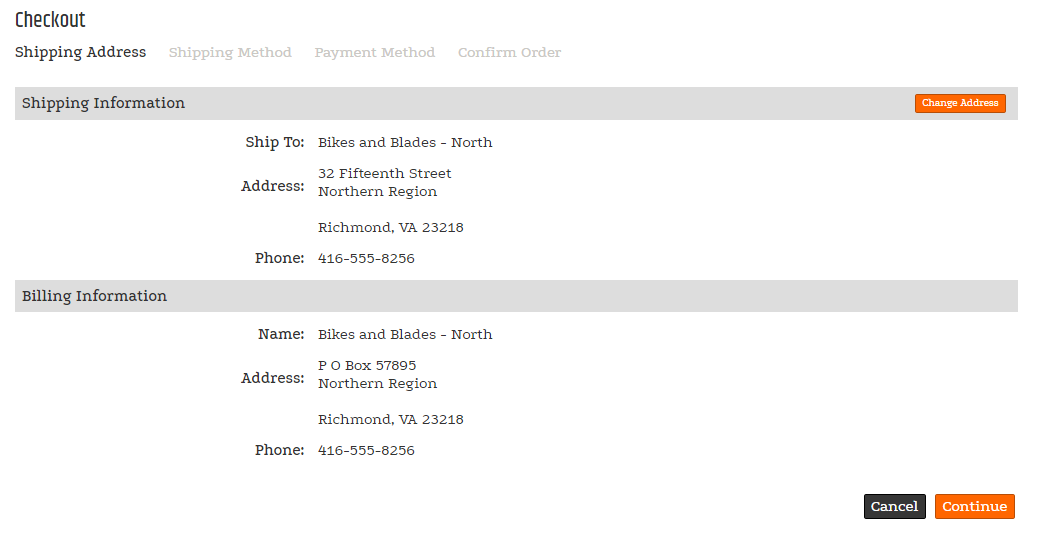
The screenshot uses fictional demonstration data. Test address behavior with non-production data in the target site.
Labels and multi-ship display
Use these properties to customize supported labels and control which multi-ship address details appear.
Labels
| Property | Default | Valid values or format | Effect |
|---|---|---|---|
DropShipButtonTextString | Not specified | Sets the Drop Ship button text. | |
DropShipLabelString | Not specified | Sets the drop-ship label. | |
OnFileButtonTextString | Not specified | Sets the On File button text. | |
MultiShipHintTextString | Not specified | Sets the multi-ship hint text. | |
MultiShipLabelDropShipString | Not specified | Sets the multi-ship label when a drop-ship address is available. | |
MultiShipLabelNoDropShipString | Not specified | Sets the multi-ship label when a drop-ship address is not available. | |
AccountIsOnFileNot specified | Not specified | Indicates if the logged on user is onFile. |
Multi-ship details
| Property | Default | Valid values or format | Effect |
|---|---|---|---|
ShowMultiShipShipToNameBoolean | Not specified | true, false | Controls whether the multi-ship ship-to name appears. |
ShowMultiShipAddress1Boolean | Not specified | true, false | Controls whether the first address line appears. |
ShowMultiShipAddress2Boolean | Not specified | true, false | Controls whether the second address line appears. |
ShowMultiShipAddress3Boolean | Not specified | true, false | Controls whether the third address line appears. |
ShowMultiShipAddressCodeBoolean | Not specified | true, false | Controls whether the address code appears. |
ShowMultiShipCityBoolean | Not specified | true, false | Controls whether the city appears. |
ShowMultiShipStateBoolean | Not specified | true, false | Controls whether the state appears. |
ShowMultiShipZipBoolean | Not specified | true, false | Controls whether the ZIP or postal code appears. |
ShowMultiShipCountryBoolean | Not specified | true, false | Controls whether the country appears. |
SitePages.config example
The following example loads CheckOutAddress.ascx and applies the documented literal defaults. The following properties are omitted because they do not have documented literal defaults: DropShipButtonText, DropShipLabel, OnFileButtonText, MultiShipHintText, MultiShipLabelDropShip, MultiShipLabelNoDropShip, AccountIsOnFile, ShowMultiShipShipToName, ShowMultiShipAddress1, ShowMultiShipAddress2, ShowMultiShipAddress3, ShowMultiShipAddressCode, ShowMultiShipCity, ShowMultiShipState, ShowMultiShipZip, ShowMultiShipCountry.
<Control src="CheckOutAddress.ascx" />
Add this <Control> element to the appropriate page placeholder as described in The SitePages.config File.
This reference does not document defaults, availability by shopper type, or the supported combinations of these properties. Validate labels and field visibility with the configured B2B, B2C, and multi-ship checkout workflows.
Related controls
The default CheckOutAddress control uses CommonStateDropDownControl to display available states in a drop-down.
Inherited properties
CheckOutAddress inherits shared visibility and shopper-access conditions from CyberStoreBaseControl. Its legacy account-state value is internal and is not documented as a configurable property.
Validate the control
- Open checkout with a B2C shopper and confirm the configured address-editing behavior.
- Open checkout with a B2B shopper and confirm the configured address-selection behavior.
- When multi-ship is enabled, confirm each selected address detail and label appears as configured.
- Confirm that any screenshots used for the configured workflow contain only approved fictional demonstration data.