CatalogItemDetailControl
CatalogItemDetailControl is the primary product-detail display control. The legacy source describes it as the main control used to present an item’s details on an item-detail page.
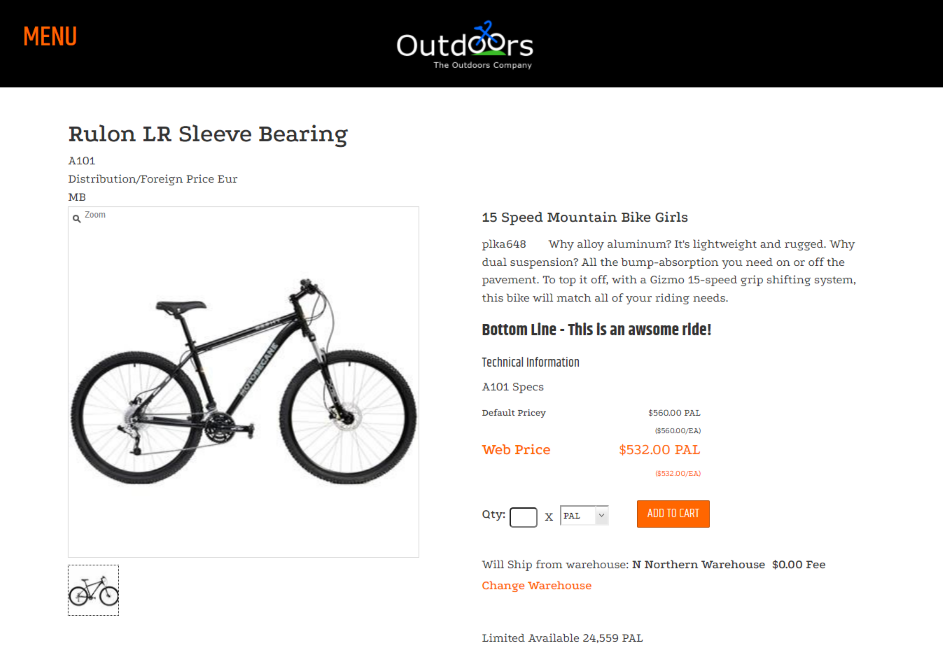
Product-detail experience
The control presents an item’s descriptive information, including its name, stock code, description, long description, headline, and subheadline. It also composes related item-detail behavior through default subcontrols.
Configure additional attributes only when they are supported by the target site’s control contract. This reference does not document a complete configuration contract.
Default subcontrols
The legacy default composition includes the following subcontrols.
| Subcontrol | Role |
|---|---|
CatalogOnHandQuanityDisplayControl | Displays an item’s on-hand quantity information. |
CatalogPricingControl | Displays item pricing and the ability to add the item to the cart. |
CatalogItemImageControl | Displays the item image. |
CatalogItemQuantityDiscountDisplay | Displays quantity-discount pricing information. |
CatalogItemSelectionControl | Displays advanced SKU selection when the item is a model. |
CatalogItemListButtonControl | Displays the item-list button for a signed-in shopper. |
CatalogCategoryBreadcrumbControl | Displays the item’s category breadcrumb. |
Item properties
The legacy source identifies the following control-specific properties.
| Property | Default | Valid values or format | Effect |
|---|---|---|---|
Item_IDstrNot specified | Not specified | Gets or sets the item ID string. | |
ItemNamestrNot specified | Not specified | Gets or sets the item name string. | |
SKUSelectionModeString | Simple if not specified in ComConfig.DefaultSKUSelectionMode | "Simple", "Advanced", "SimpleRedirect" | Gets or sets the SKU selection mode. |
AlternatePartNumberLabelTextNot specified | Not specified | Sets the alternate-part-number label. | |
ShowAlternatePartNumbersNot specified | Not specified | Controls whether alternate part numbers appear. | |
ShowTechnicalInformationBoolean | Not specified | true, false | Controls whether technical information appears. |
StockCodestrNot specified | Not specified | Gets or sets the stock-code string. | |
TechnicalInformationLabelTextString | Not specified | Sets the technical-information label. | |
ItemDataDataRow | Not specified | Gets or sets the information describing the item. |
SitePages.config example
The following example loads CatalogItemDetailControl.ascx and applies the documented literal defaults. The following properties are omitted because they do not have documented literal defaults: Item_IDstr, ItemNamestr, SKUSelectionMode, AlternatePartNumberLabelText, ShowAlternatePartNumbers, ShowTechnicalInformation, StockCodestr, TechnicalInformationLabelText, ItemData.
<Control src="CatalogItemDetailControl.ascx" />
Add this <Control> element to the appropriate page placeholder as described in The SitePages.config File.
This reference does not document allowed values or defaults for these properties.
ItemDatais contextual implementation data and is intentionally omitted.
Inherited properties
CatalogItemDetailControl derives from ItemControl and inherits its item-type visibility conditions. It also inherits the shared visibility and shopper-access conditions from CyberStoreBaseControl.
Validate the control
- Open an item-detail page and confirm the intended item information appears.
- Confirm the configured subcontrols display the expected product information and actions.
- Test the page with the item types affected by any inherited
ItemControlproperties. - Review the page on desktop and mobile layouts, including the product image, pricing, availability, and cart action.