SYSPRO Configuration
Use SYSPRO Configuration to review and maintain the connection between CyberStore and the SYSPRO ERP application. Changes can affect pricing, inventory, customer, and order processing, so coordinate them with the SYSPRO administrator and validate the connection before returning the site to normal operation.
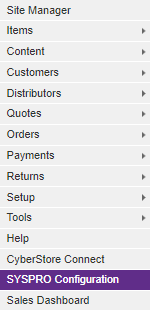
Open SYSPRO Configuration from the Management Console menu.
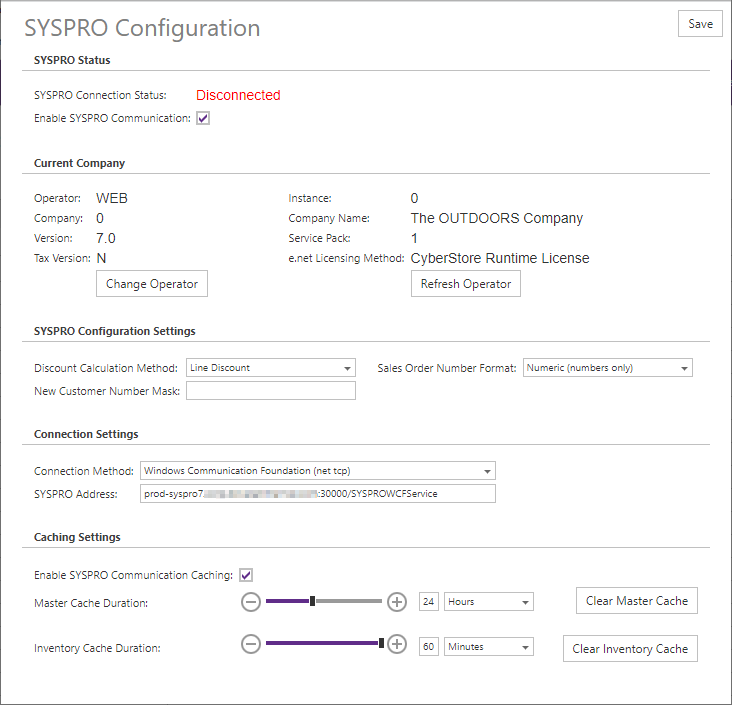
The window brings connection status, company identity, business settings, communication settings, and cache tuning together on one page.
SYSPRO status
Use the status section to confirm whether CyberStore is permitted and able to communicate with SYSPRO.
| Field | Description |
|---|---|
| SYSPRO Connection Status | Shows Connected when the active connection is available and Disconnected when CyberStore cannot currently communicate with SYSPRO. |
| Enable SYSPRO Communication | When selected, CyberStore attempts to connect to SYSPRO. Clear it to force a disconnection and prevent SYSPRO communication. |
Do not treat a Connected status as the only validation. After changing configuration, test the site functions that depend on current SYSPRO data.
Current company
The current-company section identifies the SYSPRO environment and operator used by CyberStore.
| Field or action | Description |
|---|---|
| Default Operator | SYSPRO operator CyberStore uses to sign in. |
| Instance | SYSPRO instance to which CyberStore connects, when applicable. |
| Company | Code of the SYSPRO company used by CyberStore. |
| Company Name | Name reported for the configured company. |
| Version | SYSPRO version reported by the connection. This value can be blank for older SYSPRO environments. |
| Service Pack | Service-pack level reported by SYSPRO. This value can be blank for older SYSPRO environments. |
| e.net Licensing Method | Licensing method used for the SYSPRO e.net connection. |
| Refresh Operator | Signs the current operator out and immediately signs it back in to reset the connection without restarting CyberStore or interrupting active site sessions. |
| Change Operator | Opens the credentials and company settings used for a new SYSPRO sign-in. |
Change the operator or company
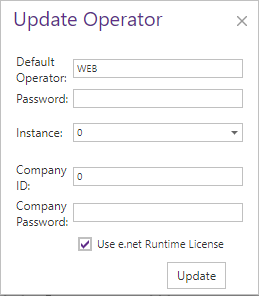
Use Change Operator when CyberStore must connect with different SYSPRO credentials or to a different company. Confirm the intended company before saving; an incorrect company can direct site transactions to the wrong SYSPRO data.
| Field | Description |
|---|---|
| Default Operator | SYSPRO operator name used by CyberStore. |
| Password | Password for the default operator. |
| Instance | SYSPRO instance used for the sign-in, when applicable. |
| Company ID | Code of the SYSPRO company CyberStore will use. |
| Company Password | Password for the company, when applicable. |
| Use e.net Runtime License | Uses a CyberStore runtime license for e.net when selected. When cleared, the connection uses standard e.net business-object licensing. |
SYSPRO configuration settings
These settings align CyberStore transaction behavior with the configured SYSPRO company.
| Field | Description |
|---|---|
| Discount Calculation Method | Selects Line Discount or Price Discount to match SYSPRO. This choice can affect pricing calculation and precision. |
| Sales Order Number Format | Selects the Alphanumeric or Numeric sales-order format used by SYSPRO. |
| New Customer Number Mask | Defines the mask used when CyberStore creates customer numbers. |
Communication settings
Communication settings define how CyberStore reaches the SYSPRO application server. Use only a connection method supported by the installed CyberStore and SYSPRO environment.
| Field | Description |
|---|---|
| Connection Method | Protocol used for SYSPRO e.net calls. The available choices can include COM/DCOM, .NET Remoting, Windows Communication Foundation (WCF), and SYSPRO Web Services. |
| Connection URL | Fully qualified network address, including the required port, to which CyberStore sends e.net requests. |
The older connection methods are intended for specific legacy or same-network deployments. SYSPRO Web Services provides an SSL-encrypted connection for environments where the CyberStore web server is outside the SYSPRO network and requires valid certificates on the applicable services. Confirm the supported method with the implementation team rather than copying a value from another environment.
When the selected method supports a configurable timeout, set the connection timeout in seconds to accommodate normal response time without masking a failed service.

Caching settings
SYSPRO communication caching reduces repeated e.net queries and is recommended for production performance. Cache duration determines how long results can remain in application memory before CyberStore queries SYSPRO again.
| Field or action | Description |
|---|---|
| Enable SYSPRO Communication Caching | Retains SYSPRO query results in CyberStore memory for the configured duration. |
| Clear SYSPRO Cache | Removes the current cached entries. Use it when a saved SYSPRO change must be available before the existing entries expire. |
| Master Cache Duration | Time to live for entries in the general SYSPRO query cache. |
| Inventory Cache Duration | Time to live for inventory queries. Non-inventory queries use the Master Cache Duration. |
Use durations appropriate to the freshness required by the site. Very short durations increase SYSPRO traffic; very long durations delay the visibility of changes. Save the configuration, confirm the connection status, and test representative pricing, inventory, customer, and order activity.