US Postal Service Shipping
Use the US Postal Service Shipping Provider integration to request freight calculations from US Postal Service during checkout. Confirm that the applicable CyberStore add-on is licensed and that the organization has an active provider account before configuration.
Configure General settings
Open Setup > Shipping Providers, add or edit the provider, and complete the General tab. Select USPS as the Provider Type.
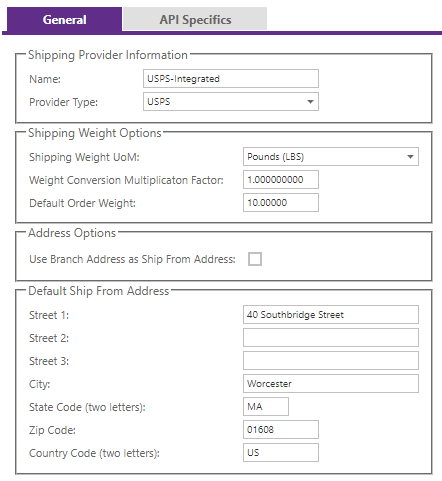
| Setting group | What to confirm |
|---|---|
| Provider identity | Use a clear Name and select the exact USPS Provider Type. |
| Shipment weight | Set the shipping weight UOM, conversion multiplication factor, and default order weight for the Site’s item-mass data. |
| Ship-from source | Choose the SYSPRO branch address or enter the complete street, city, state, postal, and country values. |
For full common-field definitions, see Shipping Provider General Settings.
Configure API settings
Obtain the US Postal Service account values from the provider representative or integration administrator before completing API Specifics.
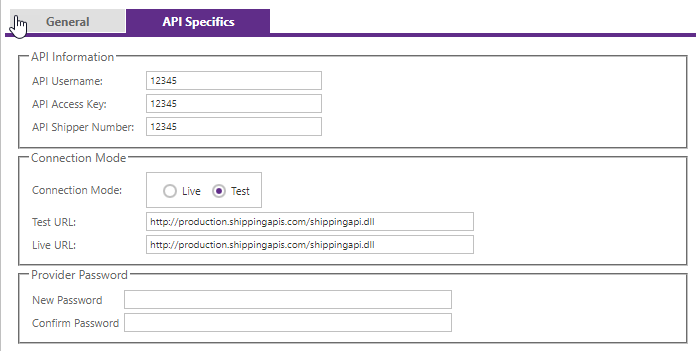
| Configuration | Requirement |
|---|---|
| Credentials | Supply the Username, Access Key, and Shipper Number required by the licensed USPS connector. |
| Connection Mode | Use the test setting while validating; use Live only with approved production credentials and endpoints. |
| Test URL | Enter the test rate endpoint approved for the installed CyberStore connector. |
| Live URL | Enter the production rate endpoint approved for the installed CyberStore connector. |
| Password | Enter the provider credential associated with the configured account where required. |
Provider endpoints are externally managed. Do not copy an endpoint from an older example without confirming that it is supported by both the provider and the installed CyberStore connector.
Validate rates
Run controlled checkout tests that cover typical and boundary conditions:
- Domestic destinations and any supported regional variations.
- Light, heavy, zero-weight, and multi-line carts.
- Branch-based and manually configured ship-from addresses.
- Expected US Postal Service services and account-negotiated rates.
- Provider errors, unavailable services, and invalid addresses.
Compare the CyberStore result with the provider account or an approved provider test. Record the accepted settings before changing Connection Mode to Live.