CheckOutDisplayOrderTotals
CheckOutDisplayOrderTotals displays the subtotal, discount, tax, shipping cost, gift-certificate value, and order total for a checkout order.
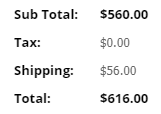
Totals behavior
The control uses the order currency when CurrencyCode is set. When it is not set, the legacy source uses the signed-in shopper’s currency for display.
Configurable properties
| Property | Default | Valid values or format | Effect |
|---|---|---|---|
CurrencyCodeString | Not specified | Sets the currency used for display. | |
DiscountLabelString | Not specified | Sets the discount label. | |
OrderTotalLabelString | Not specified | Sets the order-total label. | |
PromotionLabelString | Not specified | Sets the promotion label. | |
ShippingLabelString | Not specified | Sets the shipping label. | |
SubTotalLabelString | Not specified | Sets the subtotal label. | |
TaxLabelString | Not specified | Sets the tax label. | |
TaxMessageString | Not specified | Sets the tax message. |
SitePages.config example
The following example loads CheckOutDisplayOrderTotals.ascx and applies the documented literal defaults. The following properties are omitted because they do not have documented literal defaults: CurrencyCode, DiscountLabel, OrderTotalLabel, PromotionLabel, ShippingLabel, SubTotalLabel, TaxLabel, TaxMessage.
<Control src="CheckOutDisplayOrderTotals.ascx" />
Add this <Control> element to the appropriate page placeholder as described in The SitePages.config File.
Inherited properties
CheckOutDisplayOrderTotals inherits shared visibility and shopper-access conditions from CyberStoreBaseControl.
Validate the control
- Create an order with the configured subtotal, discount, tax, shipping, and promotion scenarios.
- Confirm displayed values and labels match the order.
- Confirm the currency formatting matches the configured order or shopper currency.
- Test the configured tax message where tax applies.