CatalogItemImageZoomControl
CatalogItemImageZoomControl is a CatalogItemImageControl subcontrol that displays item-detail photos with thumbnail navigation and optional zoom. It was introduced in v2.5.
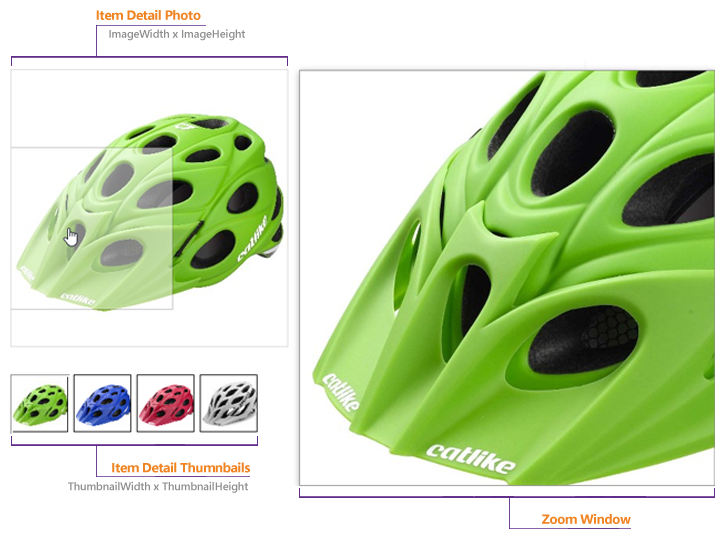
Configurable properties
| Property | Default | Valid values or format | Effect |
|---|---|---|---|
AlignString | Empty string ("") | Sets image alignment. | |
EnableZoomBoolean | true | true, false | Controls image zoom capability. |
ExpandedWindowTextString | Empty string ("") | Sets text for the expanded image window. | |
FallbackToCategoryPhotoBoolean | true | true, false | Controls fallback to the category photo when no item photo exists. |
FileBaseString | Not specified | Gets the base image file name. | |
ImageHeightUnit | 350 | Sets the displayed image height. | |
ImageWidthUnit | 350 | Sets the displayed image width. | |
Item_IDString | Not specified | Sets the item identifier. | |
LargeImageHeightUnit | 900 | Sets the large image height. | |
LargeImageWidthUnit | 900 | Sets the large image width. | |
NoZoomImageString | "~/images/photo-not-found.png" | Sets the image used when zoom is unavailable. | |
PhotoAltTextString | Empty string ("") | Sets alternate text for the photo. | |
PhotoCssClassString | Empty string ("") | Sets the CSS class for the photo. | |
PhotoLocationString | "Photo1" | Sets the photo location. | |
PhotoWidthInteger | 0 | Not used by this control; use ImageWidth and ImageHeight instead. | |
PictureNotFoundCssClassString | Empty string ("") | Sets the CSS class for a missing picture. | |
StockCodeString | Empty string ("") | Sets the item stock code. | |
ThumbnailHeightUnit | 75 | Sets the thumbnail height. | |
ThumbnailWidthUnit | 75 | Sets the thumbnail width. | |
UseOnlyCanonicalLinksBoolean | true | true, false | Controls use of canonical links for product-detail links. |
UsePhotoString | "Photo1" | "Photo1", "Photo2" | Selects the photo to display. |
ZoomPositionNot specified | "Right" | "Bottom", "Left", "Inside", "Right", "Top", "None" | Sets the mouse-over zoom position. "None" disables mouse-over zoom. |
ZoomWindowTextString | Empty string ("") | Sets text for the zoom window. |
SitePages.config example
This control is loaded as a subcontrol of CatalogItemDetailControl.ascx. The example applies the documented literal defaults. The following properties are omitted because they do not have documented literal defaults: Align, ExpandedWindowText, FileBase, Item_ID, PhotoAltText, PhotoCssClass, PictureNotFoundCssClass, StockCode, ZoomWindowText.
<Control src="CatalogItemDetailControl.ascx"
         EnableZoom="true"
         FallbackToCategoryPhoto="true"
         ImageHeight="350"
         ImageWidth="350"
         LargeImageHeight="900"
         LargeImageWidth="900"
         NoZoomImage="~/images/photo-not-found.png"
         PhotoLocation="Photo1"
         PhotoWidth="0"
         ThumbnailHeight="75"
         ThumbnailWidth="75"
         UseOnlyCanonicalLinks="true"
         UsePhoto="Photo1"
         ZoomPosition="Right" />
Add this <Control> element to the appropriate page placeholder as described in The SitePages.config File.
Not specified in the Type or Default column means the dedicated legacy property page does not state that metadata. An empty Valid values or format cell means the source does not state a constrained value list; it does not mean that any value is accepted.
Inherited properties
CatalogItemImageZoomControl inherits shared conditions from CyberStoreBaseControl.