CatalogItemCharacteristicDisplayControl
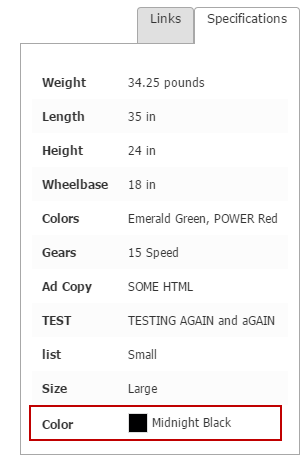
CatalogItemCharacteristicDisplayControl displays characteristics from a selected family. Color characteristics display as a color and swatch with the color’s common name.
Configurable properties
| Property | Default | Valid values or format | Effect |
|---|---|---|---|
ColorBlockHeightInteger | 20 | Sets the color-block height. | |
ColorBlockWidthInteger | 20 | Sets the color-block width. | |
DisplayFamilyNameBoolean | true | true, false | Controls family-name display. |
FamilyNameString | Empty string ("") | Sets the characteristic family name. | |
HideOnEmptyBoolean | true | true, false | Controls hiding the control when its family is empty. |
LinkWindowNameString | Empty string ("") | Sets the window used by characteristic links. | |
ShowBlanksBoolean | false | true, false | Controls blank characteristic-value display. |
SKUSelectionFieldsString Array | Not specified | Sets the SKU selection fields. |
SitePages.config example
The following example loads CatalogItemCharacteristicDisplayControl.ascx and applies the documented literal defaults. The following properties are omitted because they do not have documented literal defaults: FamilyName, LinkWindowName, SKUSelectionFields.
<Control src="CatalogItemCharacteristicDisplayControl.ascx"
         ColorBlockHeight="20"
         ColorBlockWidth="20"
         DisplayFamilyName="true"
         HideOnEmpty="true"
         ShowBlanks="false" />
Add this <Control> element to the appropriate page placeholder as described in The SitePages.config File.
Inherited properties
CatalogItemCharacteristicDisplayControl inherits shared conditions from CyberStoreBaseControl.