CheckOutShippingOptions
CheckOutShippingOptions is the second checkout step. It lets a shopper select a shipping method and provide special instructions.
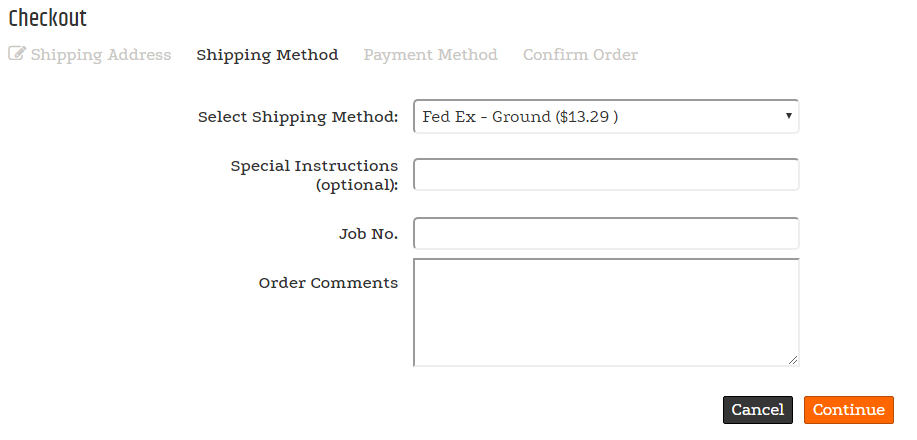
Shipping-step behavior
When an order contains items that require special handling, are oversized, or require insurance, the shopper is notified that shipping cannot be calculated online. A shopper cannot continue when the associated customer is on hold in SYSPRO or on web hold in CyberStore Administration.
Configurable properties
| Property | Default | Valid values or format | Effect |
|---|---|---|---|
OrderHeaderCommentsLabelString | Not specified | Sets the order-header comments label. | |
ShowOrderHeaderCommentsBoolean | Not specified | true, false | Controls whether order-header comments appear. |
SitePages.config example
The following example loads CheckOutShippingOptions.ascx and applies the documented literal defaults. The following properties are omitted because they do not have documented literal defaults: OrderHeaderCommentsLabel, ShowOrderHeaderComments.
<Control src="CheckOutShippingOptions.ascx" />
Add this <Control> element to the appropriate page placeholder as described in The SitePages.config File.
The legacy source identifies a requested shipping date and special instructions in the checkout experience, but does not establish configuration defaults or supported combinations for those fields.
Inherited properties
CheckOutShippingOptions inherits shared visibility and shopper-access conditions from CyberStoreBaseControl.
Validate the control
- Start checkout and confirm the available shipping methods match the configured customer and order.
- Confirm the configured order-header comments label and visibility behavior.
- Test an order that requires special handling, is oversized, or requires insurance.
- Confirm a customer on hold cannot continue past the shipping step.