Getting Around the Management Console
The Management Console uses a left-side main menu to organize the areas you can maintain in CyberStore.
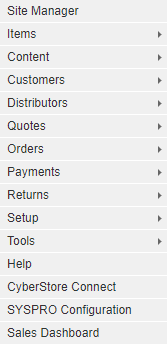
Navigate to a task
Start with the broad Console area that contains the change you need to make, such as Items, Content, or Customers. Select the right-facing arrow next to a category to open its more detailed pages.
The Console navigation commonly follows this sequence:
- Select a category from the main menu.
- Select a subcategory when one is available.
- Open the relevant grid.
- Select the record or action that opens a maintenance pop-up.
- Use the tabs in the pop-up to make the specific change.
This structure lets you start with a broad area and progressively narrow the task to the exact setting or record you need.
Find the right area
Use the Management Console overview to identify the Console area for a task. Each detailed User Guide topic describes the navigation path needed to reach its specific screen.