Archive Daily Logs
Use the Archive Daily Logs Operation to package older verbose XML log files into daily ZIP archives. The Command is ArchiveLogsToZipFiles.
Running this housekeeping Operation regularly limits the number of individual files stored directly in the configured log directory while preserving prior-day logs for later investigation.
Configure the Operation
Open Tools > Operation Center and select Add. On the General tab, enter a meaningful description and choose the ArchiveLogsToZipFiles Command.
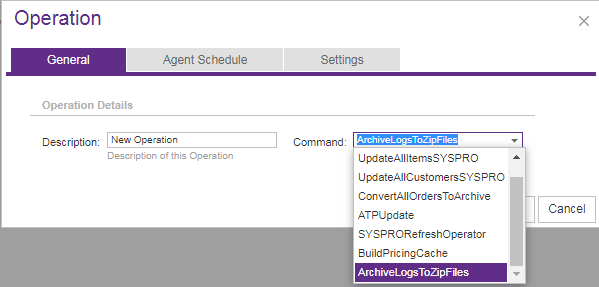
Use Agent Schedule to run the Operation at an appropriate daily interval and select the applicable Site on Settings. The Operation uses the log directory configured under Site Manager > Site Configuration > Logging.
This Command does not accept Agent Parameters.
What happens during processing
For XML log files dated before the current day, the Operation performs the following work:
- It creates a
Verbose Log Archivesfolder in the configured log directory if one does not already exist. - It groups eligible files by day.
- It moves each day’s files through a temporary month-and-year folder, such as
September 2018. - It creates one archive per day in
YYYYMMDD.zipformat. - It removes the temporary grouping folder after the ZIP file is created.
The Operation does not archive the current day’s logs, subfolders in the log directory, or files with extensions other than .xml. If no eligible files exist, it takes no action and does not report an error.
The Operation archives eligible files; it does not define a retention period for the resulting ZIP files. Manage archive retention according to your organization’s storage and diagnostic requirements.
Review the result
After the Operation finishes, review its Summary and Message details in Operation History. Confirm that the Verbose Log Archives directory contains the expected date-named ZIP files and that current-day XML logs remain available in the active log directory.