Convert Completed Orders
Use the Convert Completed Orders Operation to move completed CyberStore orders out of in-progress storage and into Order History. The Command is ConvertAllOrdersToArchive.
This Operation is useful when orders marked complete remain in the in-progress order list because they have not yet been archived.
Configure the Operation
Open Tools > Operation Center and select Add. On the General tab, enter a meaningful description and choose the ConvertAllOrdersToArchive Command.
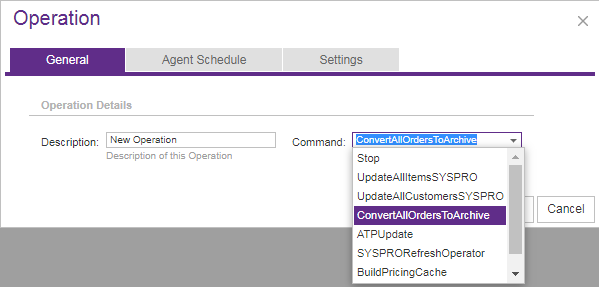
Use Agent Schedule to run the Operation immediately or at a specified date and time. Select the applicable Site on Settings.
This Command does not accept Agent Parameters. Its scope is determined by the completed, unarchived orders for the selected Site.
What happens during processing
The Operation finds orders in CyberStore’s in-progress order history that are marked COMPLETE but have not been archived. It moves those orders to the archive tables used by Order History.
Orders that are not complete remain in the in-progress history. The Operation does not provide parameters for selecting individual orders or narrowing the run by date.
Confirm the Site before running the Operation. Archiving changes where completed orders are stored and viewed; it is not a report-only action.
Review the result
After the run finishes, use Operation History to review the Summary and Message details. Then confirm that the affected completed orders are available in Order History and no longer appear as in-progress orders.