CommonRequiredPasswordControl
CommonRequiredPasswordControl displays two password fields and validates the entered password values.
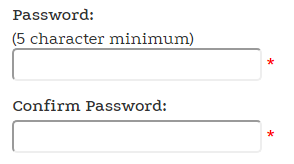
Configurable properties
| Property | Default | Valid values or format | Effect |
|---|---|---|---|
ButtonToClickString | Not specified | Sets the button used to submit the control. | |
CssClassString | Not specified | Sets the CSS class. | |
passwordtextString | Not specified | Gets the password text. | |
ValidatorsEnabledBoolean | Not specified | true, false | Controls whether validation is enabled. |
SitePages.config example
The following example loads CommonRequiredPasswordControl.ascx and applies the documented literal defaults. The following properties are omitted because they do not have documented literal defaults: ButtonToClick, CssClass, passwordtext, ValidatorsEnabled.
<Control src="CommonRequiredPasswordControl.ascx" />
Add this <Control> element to the appropriate page placeholder as described in The SitePages.config File.
Inherited properties
The control inherits shared visibility and shopper-access conditions from CyberStoreBaseControl.
Validate the control
- Display the control in the intended shopper form.
- Confirm that matching password values are accepted.
- Confirm that missing or mismatched values are rejected by the surrounding form.