CyberStore Management Console
The CyberStore Management Console is the web-based administration application used to manage CyberStore. It provides the menus and tools used to configure sites, maintain catalog and customer data, monitor operations, and manage access.
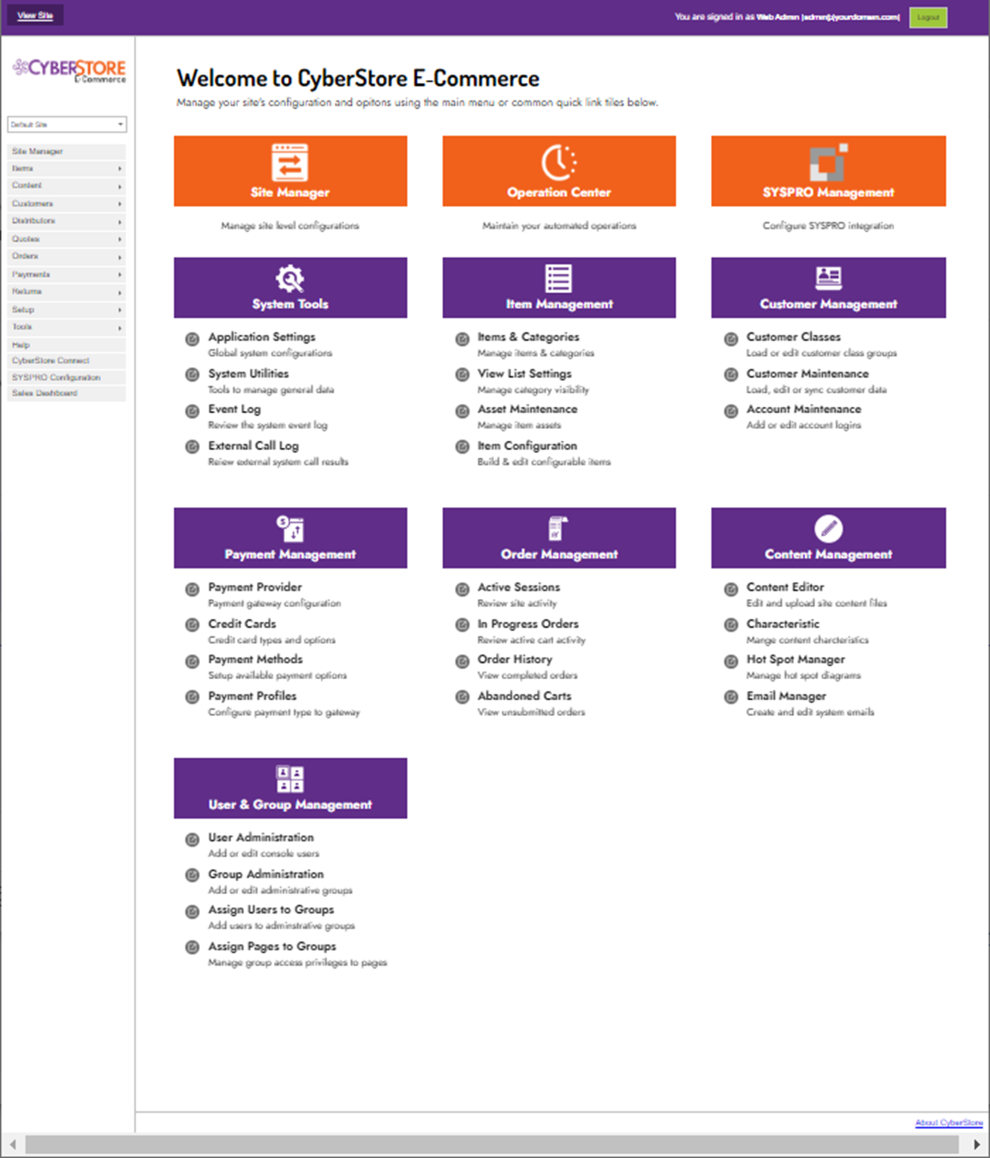
Get started
Use the Management Console to sign in, navigate to the required menu, and open the relevant maintenance or configuration screen. The primary areas are described below; links to the detailed tasks will be added as those topics are migrated.
Site and integration management
Use Site Manager to work with site-level configuration and integrations:
- Site and catalog configuration.
- Quote, order, return, and accounts-receivable integration.
Catalog and content management
Use the item, content, and setup areas to maintain the information shown on the site:
- Item, category, image, characteristic, related-item, hot-spot-diagram, and personalization maintenance.
- Content editing.
- Characteristics, characteristic families, geographic setup, currency, invoice terms, and promotions.
- Payment methods and payment profiles.
- Shipping methods and shipping providers.
Customer and order management
Use the customer and order areas to manage customer-facing data and order-related tasks:
- Customer, Account, and Customer Class maintenance.
- Distributor and order menus.
- User and group administration, including assigning users and pages to groups.
Email and application settings
The Console includes both message-maintenance and application-wide settings:
- Email Manager for programmed email responses and custom email-form confirmation content.
- Application Settings for global cache, Operation Agent, server, and SMTP settings.
Monitoring and operations
Use the Tools menu to work with operational and diagnostic functions:
- CyberStore Event Log and External Call Log Viewer.
- Price Cache Viewer and System Utilities.
- CyberStore License Manager and Operation Center.
Help, Connect, and SYSPRO configuration
Use CyberStore Connect to maintain registered integration clients and their permitted source addresses. Use SYSPRO Configuration to review the active ERP connection, company, operator, communication, and cache settings. When additional assistance is required, open Help and Support.
The Management Console is an entry point to many separate tasks. Configuration that applies to the whole application belongs in Administrator Guides; this page focuses on the Console areas users navigate to reach those tasks.
Items
Use the Items Menu to organize catalog categories and maintain product data.
Content
Use the Content Menu to maintain the site’s theme and content files.
Customers
Use the Customers Menu to maintain customer, account, and customer-class policies.
Distributors
Use the Distributors Menu to maintain distributor information available to site visitors.
Orders
Use the Orders Menu to review shopper activity around sales orders.
Setup
Use the Setup Menu to maintain shared system configuration.