CustomerChangeRequestShipDateControl
CustomerChangeRequestShipDateControl lets shoppers set or change the requested ship date used by Available to Promise calculations. It presents a required date-selection prompt after sign-in when the site and customer class use Available to Promise.
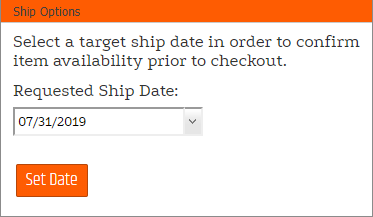

Configurable properties
| Property | Default | Valid values or format | Effect |
|---|---|---|---|
CheckoutActiveErrorMessageTextString | Not specified | Sets the message shown when checkout prevents a date change. | |
EnableRequestedEndDateWeekendSelectionBoolean | Not specified | true, false | Controls weekend selection for the requested end date. |
EnableRequestedShipDateRangeBoolean | Not specified | true, false | Controls requested ship-date range selection. |
EnableRequestedShipDateWeekendSelectionBoolean | Not specified | true, false | Controls weekend selection for the requested ship date. |
MaximumRequestedShipDateFromTodayInt | Not specified | Sets the latest requested ship date relative to today. | |
MaximumRequestedShipDateRangeDaysInt | Not specified | Sets the maximum length of a requested date range. | |
MinimumRequestedShipDateFromTodayInt | Not specified | Sets the earliest requested ship date relative to today. | |
MinimumRequestedShipDateRangeDaysInt | Not specified | Sets the minimum length of a requested date range. | |
RedirectAfterDateChangeNot specified | Not specified | Controls redirecting after a requested date change. | |
RedirectAfterDateChangeURLString | Not specified | Sets the redirect destination after a requested date change. | |
RequestedEndDateLabelTextString | Not specified | Sets the requested end-date label. | |
RequestedShipDateChangeButtonTextString | Not specified | Sets the status-view Change Date button text. | |
RequestedShipDateInstructionsTextString | Not specified | Sets the date-selection instructions. | |
RequestedShipDateLabelTextString | Not specified | Sets the requested ship-date label. | |
RequestedShipDateSubmitButtonTextString | Not specified | Sets the date-selection submit button text. |
SitePages.config example
The following example loads CustomerChangeRequestShipDateControl.ascx and applies the documented literal defaults. The following properties are omitted because they do not have documented literal defaults: CheckoutActiveErrorMessageText, EnableRequestedEndDateWeekendSelection, EnableRequestedShipDateRange, EnableRequestedShipDateWeekendSelection, MaximumRequestedShipDateFromToday, MaximumRequestedShipDateRangeDays, MinimumRequestedShipDateFromToday, MinimumRequestedShipDateRangeDays, RedirectAfterDateChange, RedirectAfterDateChangeURL, RequestedEndDateLabelText, RequestedShipDateChangeButtonText, RequestedShipDateInstructionsText, RequestedShipDateLabelText, RequestedShipDateSubmitButtonText.
<Control src="CustomerChangeRequestShipDateControl.ascx" />
Add this <Control> element to the appropriate page placeholder as described in The SitePages.config File.
Inherited properties
CustomerChangeRequestShipDateControl inherits shared conditions from CyberStoreBaseControl.