Process PunchOut Invoices
Use the Process PunchOut Invoices Operation to create and transmit invoice cXML for sales orders received through CyberStore PunchOut Order Intake. The Command is ProcessPunchOutInvoices.
This Operation belongs to the separately licensed PunchOut Invoice Module. Configure it only for Customers whose procurement integration is prepared to receive invoice messages.
Enable invoice messaging
Before scheduling the Operation, enable and configure invoice messaging for the applicable Customer under Customers > Customer Maintenance > Settings > Punch Out Options. The settings identify how CyberStore transforms and transmits that Customer’s invoices.
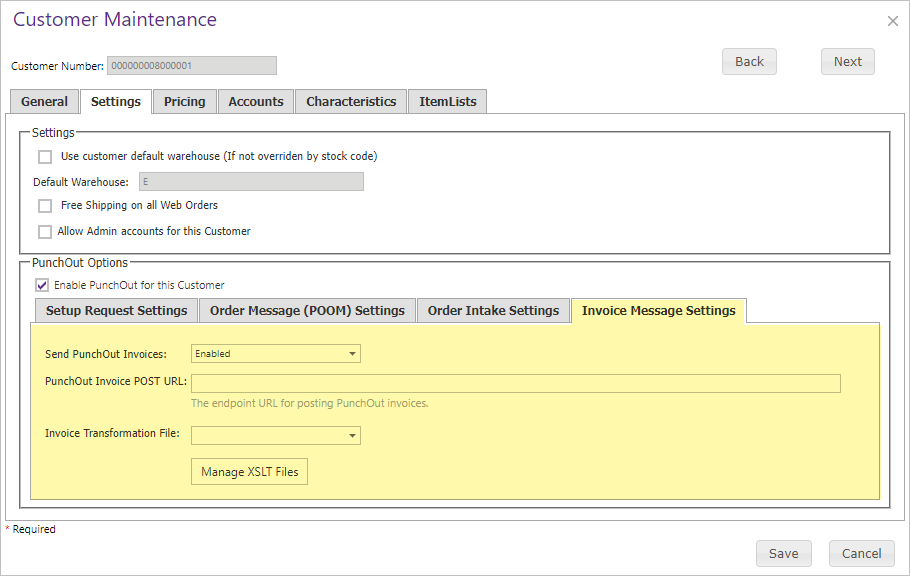
Confirm the transformation and destination settings with the Customer’s procurement-system administrator before sending production invoices.
Configure the Operation
Open Tools > Operation Center and select Add. On the General tab, enter a meaningful description and choose the ProcessPunchOutInvoices Command. Use Agent Schedule to run it immediately, at a specified time, or on a recurring interval appropriate for invoice delivery.
On Settings, select the Site and optionally enter parameters that limit the sales orders or invoices in scope. Enter each parameter on its own line.
| Parameter | Purpose | Behavior and example |
|---|---|---|
Orders | Limits processing to specified sales order numbers. | Comma-separated values, for example Orders: 4140, 4142. |
OrderStartDate | Includes orders on or after this order date. | Use M/D/YYYY or MM/DD/YYYY. If no end date is supplied, the end date defaults to today. |
OrderEndDate | Includes orders on or before this order date. | Use M/D/YYYY or MM/DD/YYYY. If no start date is supplied, the start date defaults to 01/01/2000. |
InvoiceStartDate | Includes invoices on or after this invoice date. | Use M/D/YYYY or MM/DD/YYYY. If no end date is supplied, the end date defaults to today. |
InvoiceEndDate | Includes invoices on or before this invoice date. | Use M/D/YYYY or MM/DD/YYYY. If no start date is supplied, the start date defaults to 01/01/2000. |
Clear | Clears CyberStore’s sent-invoice history for specified sales orders so their invoices can be processed again. | Comma-separated order numbers, for example Clear: 4140, 4142. When one or more orders are supplied, the Operation clears their history and ends without processing invoices. If no order values are supplied, it clears nothing and normal invoice processing continues. |
TestMode | Exercises invoice handling without transmitting cXML to the configured endpoint. | TestMode: true; defaults to false. CyberStore treats the simulated transmission as successful and continues linked-order processing. |
Clearing sent-invoice history can cause an invoice to be submitted again and may produce duplicate-invoice errors in the receiving procurement system. Use
Clearonly for deliberate recovery or retesting.
TestModedoes not send the invoice, but it processes linked orders as if delivery succeeded. Use it only in a controlled test scenario where that state change is expected.
What happens during processing
The Operation Agent determines the sales orders in scope, creates an Operation Transaction, and processes each order individually:
- CyberStore queries SYSPRO Accounts Receivable for invoices associated with sales orders previously created through PunchOut Order Intake.
- It transforms the returned invoice data into PunchOut cXML using the configured XSLT.
- It transmits the cXML to the Customer’s configured invoice destination, unless
TestModeis enabled. - It adds the invoice number to the sent-invoice history associated with the sales order or invoiced dispatch note.
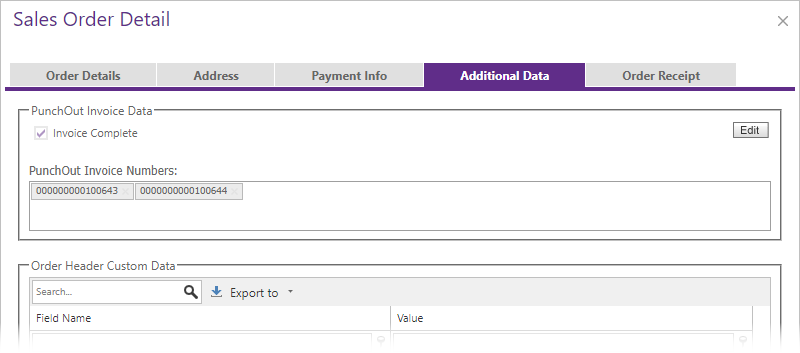
- It marks the order fully invoiced when it is closed or fully shipped; otherwise, it records a partial-invoice status.
Processing issues are recorded with the Operation Transaction. When the run finishes, Operation Center stores the details and sends notifications according to its settings.
Review invoice status
After the Operation finishes, review its Summary and Message details in Operation History. Then use CyberStore Order History to confirm the invoice status of the affected PunchOut orders.
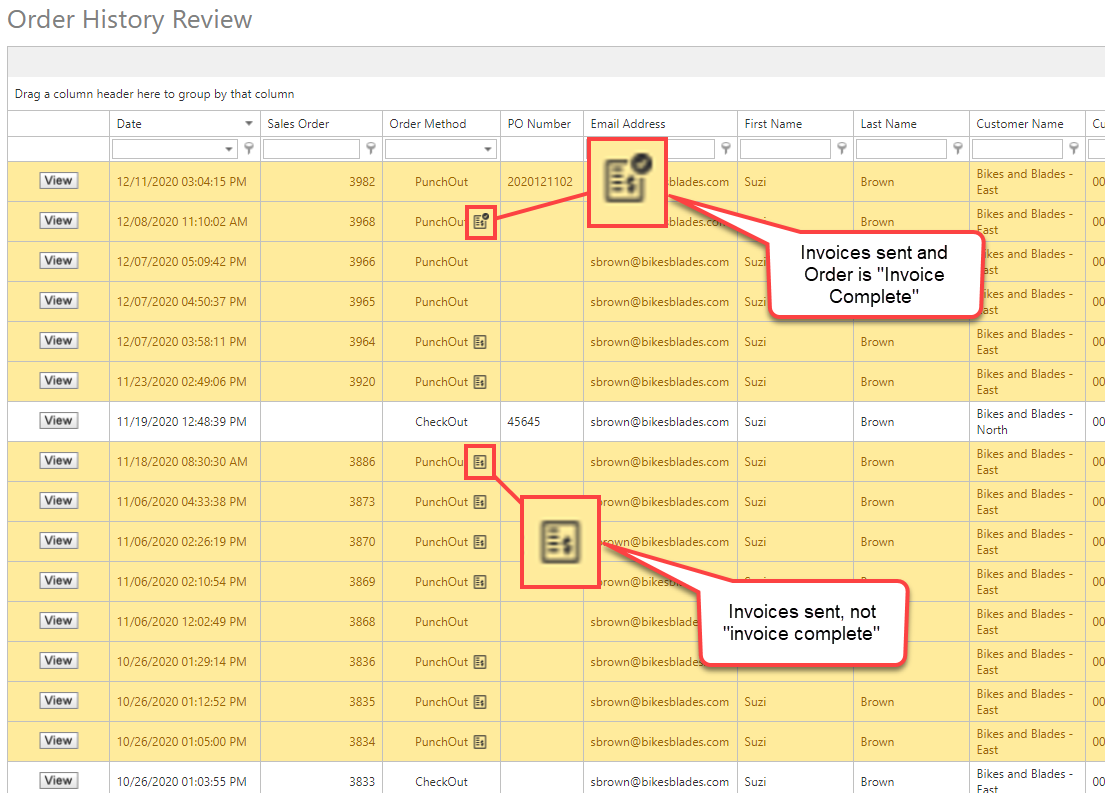
Open Additional Data when you need to review the PunchOut information stored with an order and correlate it with the invoice-processing result.
For the buyer-session and order-intake sequence that precedes invoicing, see PunchOut.