CustomerLoginControl
CustomerLoginControl renders sign-in actions. After authentication, it can show account and logout links, and it shows a checkout link when the shopper has items in the cart.
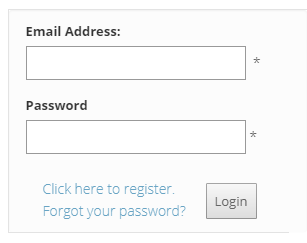
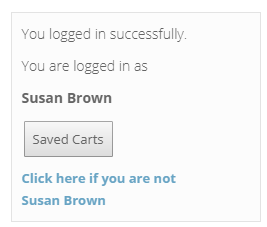
Configurable properties
| Property | Default | Valid values or format | Effect |
|---|---|---|---|
AuthenticateNovoOnLoginBoolean | Not specified | true, false | Controls novo CMS authentication after CyberStore sign-in. |
CheckoutButtonTextString | Not specified | Sets the checkout button text. | |
ClickHereIfNotString | Not specified | Sets the signed-in identity-change link text. | |
EditAccountButtonTextString | Not specified | Sets the edit-account button text. | |
LoginButtonTextString | Not specified | Sets the login button text. | |
RedirectHomeAfterLoginBoolean | Not specified | true, false | Controls redirecting to the application home page after sign-in. |
SavedCartButtonTextString | Not specified | Sets the saved-cart button text. |
SitePages.config example
The following example loads CustomerLoginControl.ascx and applies the documented literal defaults. The following properties are omitted because they do not have documented literal defaults: AuthenticateNovoOnLogin, CheckoutButtonText, ClickHereIfNot, EditAccountButtonText, LoginButtonText, RedirectHomeAfterLogin, SavedCartButtonText.
<Control src="CustomerLoginControl.ascx" />
Add this <Control> element to the appropriate page placeholder as described in The SitePages.config File.
Inherited properties
CustomerLoginControl inherits shared conditions from CyberStoreBaseControl.