Item Defaults
Use the Item Defaults tab in Site Manager > Catalog Configuration to define the default SKU-selection experience and accessory ordering behavior.
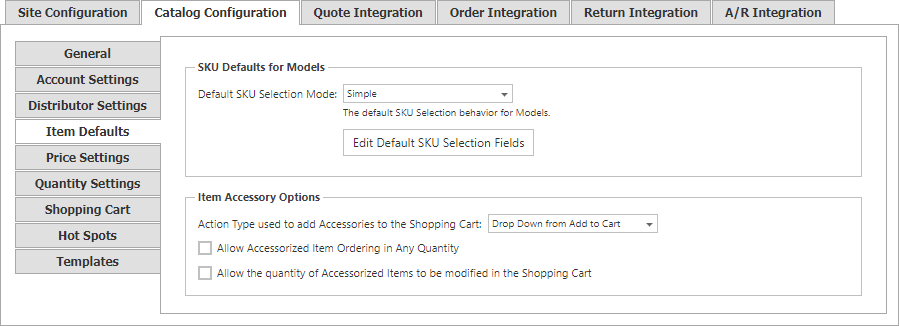
SKU selection
The default selection mode applies to CatalogPricingControl, unless its SKUSelectionMode property overrides it.
| Mode | Behavior |
|---|---|
| Simple | Shows the SKU-selection list and loads the SKU price on the current item-detail page. |
| Simple Redirect | Shows the SKU-selection list and redirects the shopper to the selected SKU’s detail page. |
| Advanced | Guides the shopper through SKU options and loads the resulting SKU details on the current page. |
Use Edit Default SKU Selection Fields to arrange the Family/Characteristic pairs used for SKU selection. Add a pair by choosing an item-type family and its related characteristic; use Top, Up, Down, and Bottom to set processing order. The saved SKUSelectionFields value is a comma-delimited list, ordered from left to right.
If item-level SKU selection fields are used, do not define
SKUSelectionFieldsinside SitePages.config control definitions.
Accessories
| Setting | Description |
|---|---|
| Action Type used to add Accessories to the Shopping Cart | Choose Drop Down (the default) or Button. A separately configured always-add-with-accessories item uses the button behavior. |
| Allow Accessorized Item Ordering in Any Quantity | Lets shoppers add an accessorized item and its individual accessories in quantities above any configured minimum. When disabled, they are added as quantity one and cannot be changed. |
| Allow the quantity of Accessorized Items to be modified in the Shopping Cart | Lets shoppers change the quantities in the cart. When disabled, the main-item quantity control is hidden and unavailable in the accessory grid. |