General

Use the General tab to review the selected SYSPRO method and choose the calculation type CyberStore uses to calculate the shopper’s shipping price.
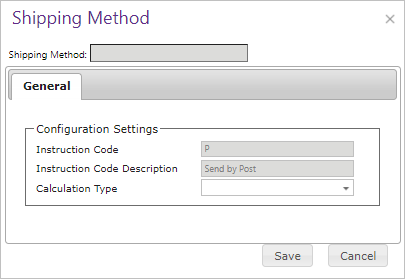
Shipping Method General tab

Field Description
Instruction Code Character code for the mapped SYSPRO shipping instruction. Read-only. Each CyberStore shipping method must map to a unique SYSPRO code.
Instruction Code Description SYSPRO description displayed to the shopper as the shipping-method label. Read-only.
Calculation Type Selects Provider, TotalSimple, or Percentage calculation. Changing the type resets configuration that belongs to the previous type.

Calculation types

The selected calculation type determines which additional fields appear.

Calculation type Configuration purpose
Provider Maps the method to a configured carrier service and optionally adjusts the returned rate.
TotalSimple Uses a tiered matrix to assign a flat shipping amount from item subtotal, total item mass, or total item volume.
Percentage Applies a percentage of item subtotal and an optional flat fee.

Provider settings

Provider methods request real-time rates from a configured carrier integration.

Provider shipping method configuration

Field Description
Carrier Code Selects the configured Shipping Provider. Provider configuration supplies credentials, endpoints, origin addresses, and unit conversion.
Carrier Method Name Selects the provider service and maps it to the SYSPRO shipping instruction.
Required Weight for Method Minimum total item weight required to calculate with this method. When the threshold is not met, CyberStore uses an alternate method.
Default Alternate Method Below Required Weight Selects the default method used to calculate the shipping price below the required weight. Checkout continues to display the original method name.
Manage Alternates By Branch Allows a Customer branch to select an alternate that takes precedence over the default alternate.

Configure provider credentials and endpoints through Shipping Providers.

UPS OAUTH providers use the same Carrier Code, Carrier Method Name, alternate-method, and rate-adjustment controls as other Provider methods. CyberStore automatically splits shipments into packages of no more than 150 pounds before requesting a UPS OAuth rate.

Provider rate adjustments

Provider methods can adjust the returned rate before presenting it to the shopper.

Field Description
Adjust Carrier’s Shipping Rates Enables a primary adjustment to the provider or alternate-method rate.
Adjustment Type Selects a discount that decreases the rate or a surcharge that increases it.
Value Type Applies the adjustment as a percentage or flat amount.
Amount Sets the adjustment value. An adjustment cannot reduce the final shipping amount below zero.
Use Secondary Adjustment Matrix Enables an additional tiered adjustment based on item subtotal, total item mass, or total item volume.

Calculation matrix

The matrix is the primary price source for TotalSimple methods and an optional secondary adjustment for Provider methods.

Field Description
Calc Basis Selects item subtotal, total item mass, or total item volume as the value used to evaluate matrix thresholds.
Calculation Value Sets the inclusive upper threshold for the row. Duplicate values are not allowed.
Type For a Provider secondary matrix, selects a flat or percentage increase or decrease.
Shipping Cost Sets the TotalSimple flat amount or Provider adjustment value for the row.

TotalSimple

Use TotalSimple to configure flat shipping amounts without an external provider.

TotalSimple shipping method configuration

Percentage

Use Percentage to configure a positive percentage of the item subtotal and an optional flat fee of zero or greater.

Percentage shipping method configuration

Save the method after configuring the calculation type and any fields it requires.

See Shipping Calculation for matrix evaluation, Provider calculation order, alternate methods, overrides, and error handling.


This site uses Just the Docs, a documentation theme for Jekyll.