Quantity Settings
Use the Quantity Settings tab in Site Manager > Catalog Configuration to control inventory display, allocation checks, lead-time messages, and Available to Promise (ATP) behavior.
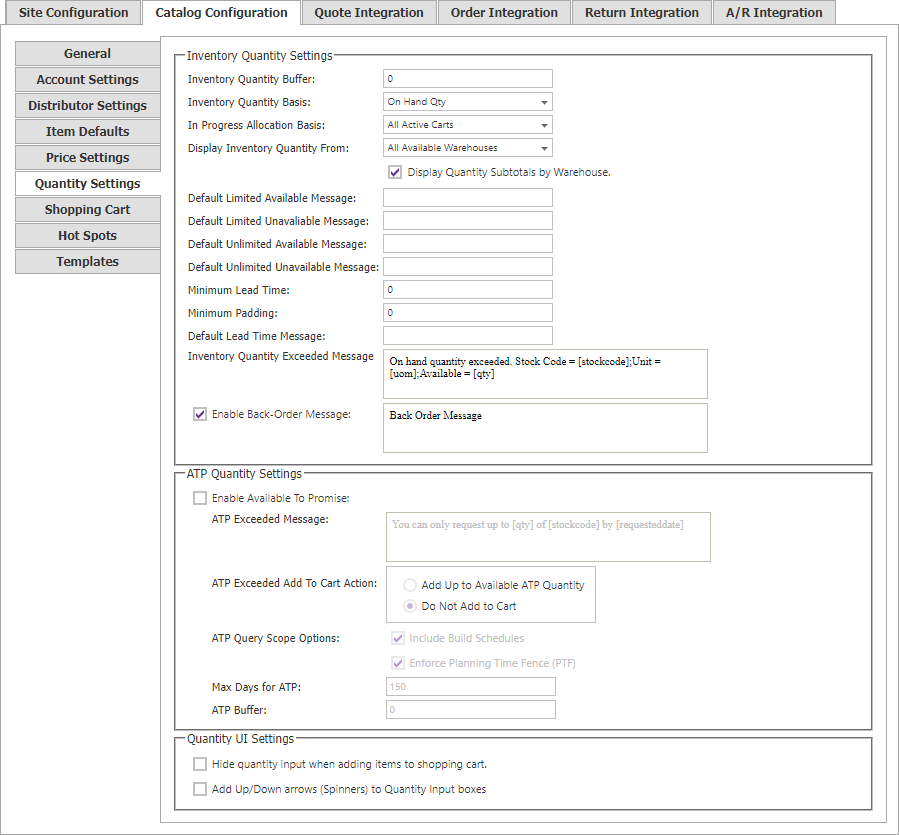
Inventory display
| Setting | Description |
|---|---|
| Inventory Quantity Buffer | Amount subtracted from displayed stock for every item. |
| Inventory Quantity Basis | SYSPRO quantity used for availability: On Hand, Available, Future Free, or Unallocated. |
| Display Inventory Quantity From | Uses all available warehouses or the prevailing customer/item warehouse. |
| Display Quantity Subtotals by Warehouse | Shows a warehouse-by-warehouse table for warehouses CyberStore can access through SYSPRO web-operator settings. |
Do not display warehouse subtotals when using an inventory buffer: the buffer is subtracted from each warehouse quantity.
In-progress allocation and messages
In Progress Allocation Basis can include all active carts or only carts in checkout. Abandoned-cart quantities are always ignored.
Set the default messages for limited or unlimited availability, unavailable items, and lead time. Use [LEADTIME] in the lead-time message. Use [QTY], [UOM], and [StockCode] in the on-hand-quantity-exceeded message. Enable Back-Order Message displays a configurable back-order message.
Available to Promise
Enable Available to Promise to apply ATP calculations in addition to inventory lookup. Shoppers must enter a requested ship date or date range, and cannot add a quantity that is unavailable for that requested date.
| Setting | Description |
|---|---|
| Available to Promise Message | Custom ATP message. Supports [Qty], [UOM], [StockCode], [RequestedDate], and [RequestedEndDate]. |
| ATP Exceeded Add to Cart Action | Controls the action when the requested quantity exceeds ATP. |
| Max Days for Available to Promise | Maximum number of days considered for ATP processing. A requested date beyond this limit is treated as available to promise. |
| ATP Buffer | Quantity excluded from purchase availability. |
| Hide quantity input when adding items to Shopping Cart | Hides the quantity input when adding an item. |
| Add Up/Down arrows (Spinners) to Quantity input boxes | Adds spinner arrows to quantity inputs. |