Shipping Provider API Settings
Use the API Specifics tab to connect CyberStore to the selected provider’s shipping account. The fields on this tab change according to the Provider Type selected on the General tab.
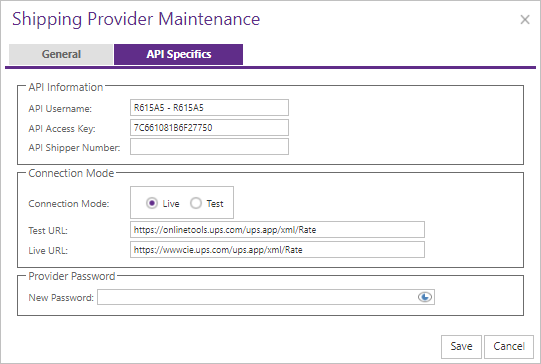
Common settings
| Setting | Description |
|---|---|
| Connection Mode | Test or Live. |
| Test URL and Live URL | Provider endpoints where the selected integration exposes configurable URLs. The Connection Mode determines which URL is active. |
Legacy provider credentials
Legacy providers can display account fields such as API Username, Access Key, Shipper Number, and New Password. Obtain the required values from the provider or integration administrator.
UPS OAuth credentials
When Provider Type is UPS OAUTH, configure the following values:
| Setting | Description |
|---|---|
| Client ID | Client identifier issued for the UPS OAuth application. |
| Client Secret | Secret issued with the Client ID. |
| Connection Mode | Selects the Test or Live base URL. |
| Test URL | https://wwwcie.ups.com/ |
| Live URL | https://onlinetools.ups.com/ |
CyberStore derives the OAuth token and rating endpoints from the base URL selected by Connection Mode. The endpoint paths do not require separate configuration.
Client IDs, client secrets, passwords, access keys, and access tokens are sensitive. Do not include their values in screenshots or support messages.
Configure only a licensed provider and validate in Test mode before switching to Live.