CheckOutPaymentMethods
CheckOutPaymentMethods is the third checkout step. It lets a shopper select a payment method associated with the shopper’s customer class and can display a promotion-code field.
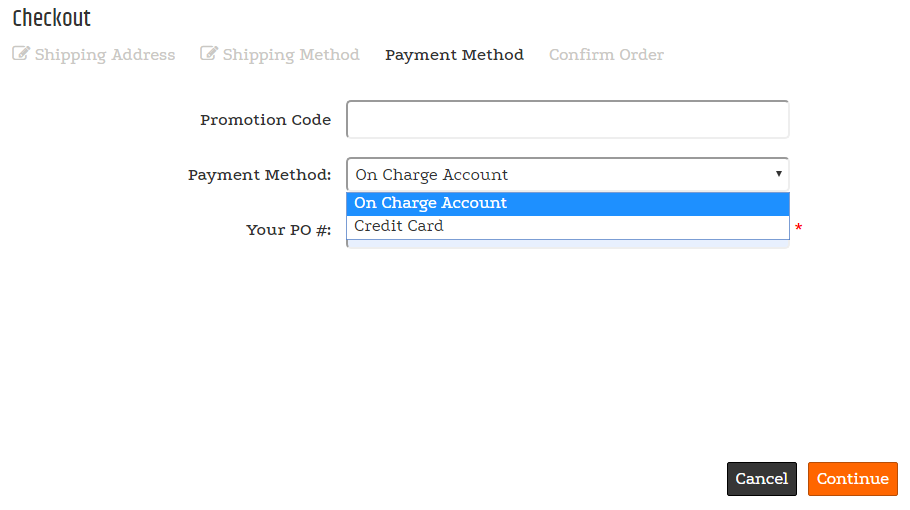
Payment-step behavior
The available payment methods depend on the shopper’s customer class. The control can include the GiftCertificate subcontrol for entering a promotion code toward an order.
Configurable properties
| Property | Default | Valid values or format | Effect |
|---|---|---|---|
PaymentOptionsNot specified | Not specified | Controls payment options. | |
CCardoptionsNot specified | Not specified | Controls credit-card options. | |
CreditCardImageBaseString | Not specified | Specifies the directory used to locate credit-card images. | |
PromotionCodeLabelString | Not specified | Sets the promotion-code label. | |
ShowPromotionCodeBoolean | Not specified | true, false | Controls whether the promotion-code field appears. |
SitePages.config example
The following example loads CheckOutPaymentMethods.ascx and applies the documented literal defaults. The following properties are omitted because they do not have documented literal defaults: PaymentOptions, CCardoptions, CreditCardImageBase, PromotionCodeLabel, ShowPromotionCode.
<Control src="CheckOutPaymentMethods.ascx" />
Add this <Control> element to the appropriate page placeholder as described in The SitePages.config File.
The legacy source does not document allowed payment-option values, card-option values, or defaults. Validate those values with the configured payment integration.
Inherited properties
CheckOutPaymentMethods inherits shared visibility and shopper-access conditions from CyberStoreBaseControl.
Validate the control
- Sign in with each configured customer class and confirm the expected payment methods appear.
- Confirm the promotion-code label and visibility setting.
- Verify configured card images resolve from the approved site asset location.
- Complete a payment-method selection using non-production test data.