CheckOutDisplayOrderReceipt
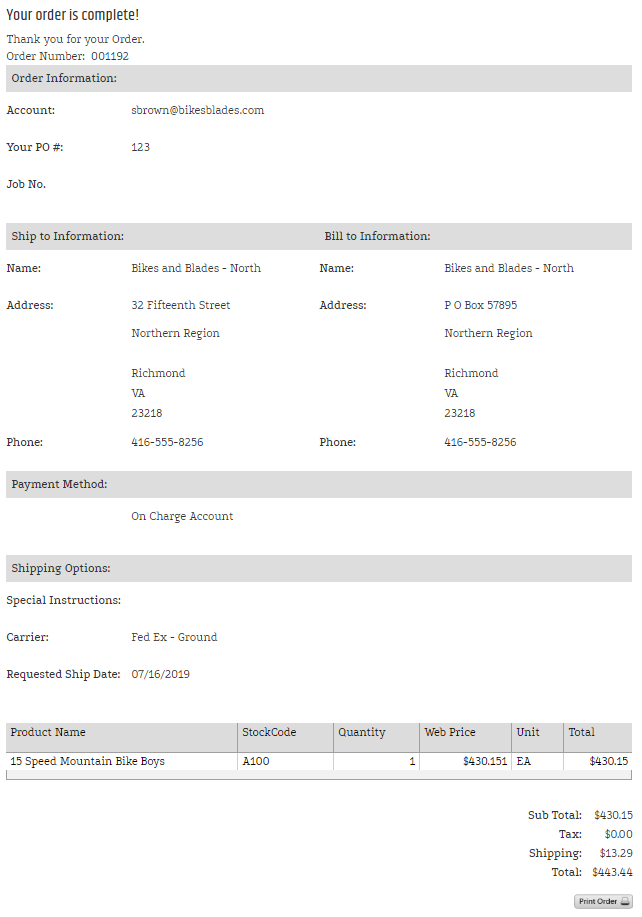
CheckOutDisplayOrderReceipt displays order information after a shopper confirms an order.
Receipt behavior
The control uses CheckOutOrderDisplayControl to display the order summary. The legacy source also shows a print action for the receipt.
Configurable properties
| Property | Default | Valid values or format | Effect |
|---|---|---|---|
OrderDisplayNameString | Not specified | Sets the order-display name. |
SitePages.config example
The following example loads CheckOutDisplayOrderReceipt.ascx and applies the documented literal defaults. The following properties are omitted because they do not have documented literal defaults: OrderDisplayName.
<Control src="CheckOutDisplayOrderReceipt.ascx" />
Add this <Control> element to the appropriate page placeholder as described in The SitePages.config File.
Inherited properties
CheckOutDisplayOrderReceipt inherits shared visibility and shopper-access conditions from CyberStoreBaseControl.
Validate the control
- Confirm an order using non-production data.
- Confirm the receipt displays the expected order summary and display name.
- Confirm the receipt’s print action opens the intended printable view.
- Verify the receipt contains only the intended order information for the signed-in shopper.