Shopping Cart Settings
Use the Shopping Cart tab in Site Manager > Catalog Configuration to control cart-line descriptions, cart behavior, and PunchOut logging.
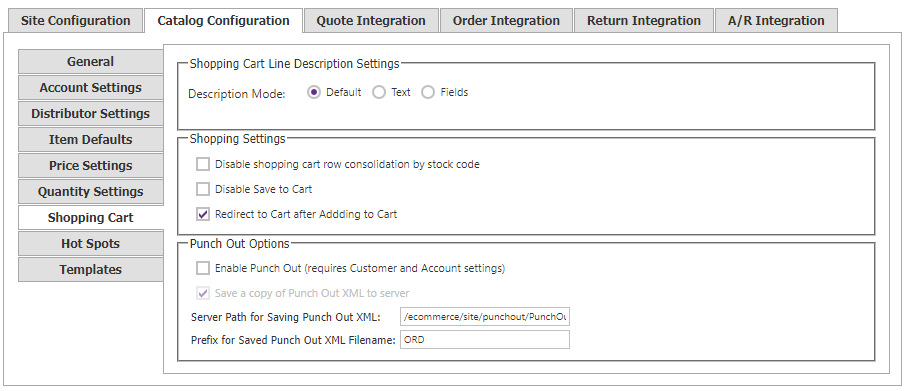
Cart-line description
Choose how an item is described in the shopper-facing cart and confirmation screen.
| Option | Behavior |
|---|---|
| Default | Uses the item name. |
| Text | Uses Item Name, SYSPRO Long Description (LongDescription2), or both with a separator. |
| Fields | Uses any ordered combination of Item Name, SYSPRO Long Description, and UserField1, with an optional separator. |
This setting affects front-end presentation only. The submitted sales-order line continues to use the item name (SYSPRO Description) unless UseStockDescSupplied is enabled under Site Manager > Order Integration > Settings.
Cart behavior
| Setting | Description |
|---|---|
| Disable Shopping Cart row consolidation by stock code | Keeps matching stock-code lines separate in the cart. |
| Disable Save to Cart | Disables saving a cart. |
| Redirect to Cart after Adding to Cart | Sends the shopper to the cart after an item is added. |
PunchOut logging
Enable PunchOut only after required customer and account setup is complete. Save a copy of Punch Out XML to server writes PunchOut cXML files to the configured server path, with the configured filename prefix.