This is archived CyberStore v2024.1 documentation. For current guidance, see the latest documentation.
CatalogCategoryDiagramListing
CatalogCategoryDiagramListing displays Hot Spot diagrams for catalog items that have them enabled. It was introduced in v2.5.
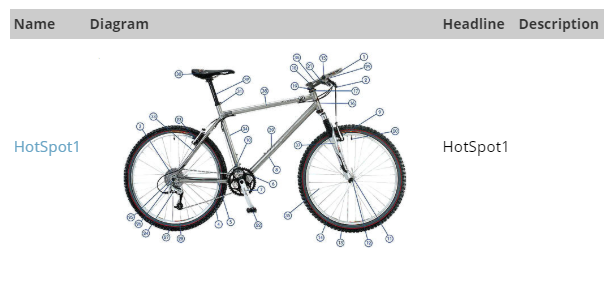
Configurable properties
| Property | Default | Valid values or format | Effect |
|---|---|---|---|
HotSpotDiagramEmptyDisplayBoolean | false | true, false | Controls whether the diagram listing is displayed when no data is available. |
HotSpotDiagramFolderLocationString | "~/CatalogHotSpot.aspx" | Sets the Hot Spot diagram folder location. | |
HotSpotDiagramGridAlwaysDisplayPagerBoolean | false | true, false | Controls whether the grid pager is displayed when there are fewer than two pages. |
HotSpotDiagramGridDisplayBoolean | true | true, false | Selects whether the listing uses the grid or data-list display. |
HotSpotDiagramGridDisplayDescriptionColumnBoolean | true | true, false | Controls the grid description column. |
HotSpotDiagramGridDisplayDescriptionHeaderString | "Description" | Sets the grid description-column header. | |
HotSpotDiagramGridDisplayDiagramColumnBoolean | true | true, false | Controls the grid diagram-image column. |
HotSpotDiagramGridDisplayDiagramHeaderString | "Diagram" | Sets the grid diagram-image header. | |
HotSpotDiagramGridDisplayHeadersBoolean | true | true, false | Controls grid header display. |
HotSpotDiagramGridDisplayHeadlineColumnBoolean | true | true, false | Controls the grid headline column. |
HotSpotDiagramGridDisplayHeadlineHeaderString | "Head Line" | Sets the grid headline-column header. | |
HotSpotDiagramGridDisplayNameColumnBoolean | true | true, false | Controls the grid diagram-name column. |
HotSpotDiagramGridDisplayNameHeaderString | "Name" | Sets the grid diagram-name header. | |
HotSpotDiagramGridPageSizeInteger | ITM_CatalogListingPageSize or 10 | Sets the Hot Spot diagram grid page size. | |
HotSpotDiagramListColumnsInteger | 2 | Sets the number of columns in the data-list layout. | |
HotSpotDiagramListGridLinesString | "None" | Sets grid lines for the data-list layout. | |
HotSpotDiagramListRepeatDirectionString | "Horizontal" | Sets the data-list repeat direction. | |
HotSpotDiagramListRepeatLayoutString | Not specified | Sets the data-list layout type. | |
HotSpotDiagramNoDataMessageString | "Sorry, there are no Diagrams associated with this Item." | Sets the message shown when no diagram data is available. | |
HotSpotDiagramPhotoWidthInteger | 100 | Sets the diagram photo width. | |
HotSpotDiagramURLString | "~/CatalogHotSpot.aspx" | Sets the link URL for a Catalog Hot Spot. |
SitePages.config example
The following example loads CatalogCategoryDiagramListing.ascx and applies the documented literal defaults. The following properties are omitted because they do not have documented literal defaults: HotSpotDiagramListRepeatLayout.
<Control src="CatalogCategoryDiagramListing.ascx"
         HotSpotDiagramEmptyDisplay="false"
         HotSpotDiagramFolderLocation="~/CatalogHotSpot.aspx"
         HotSpotDiagramGridAlwaysDisplayPager="false"
         HotSpotDiagramGridDisplay="true"
         HotSpotDiagramGridDisplayDescriptionColumn="true"
         HotSpotDiagramGridDisplayDescriptionHeader="Description"
         HotSpotDiagramGridDisplayDiagramColumn="true"
         HotSpotDiagramGridDisplayDiagramHeader="Diagram"
         HotSpotDiagramGridDisplayHeaders="true"
         HotSpotDiagramGridDisplayHeadlineColumn="true"
         HotSpotDiagramGridDisplayHeadlineHeader="Head Line"
         HotSpotDiagramGridDisplayNameColumn="true"
         HotSpotDiagramGridDisplayNameHeader="Name"
         HotSpotDiagramGridPageSize="ITM_CatalogListingPageSize` or `10"
         HotSpotDiagramListColumns="2"
         HotSpotDiagramListGridLines="None"
         HotSpotDiagramListRepeatDirection="Horizontal"
         HotSpotDiagramNoDataMessage="Sorry, there are no Diagrams associated with this Item."
         HotSpotDiagramPhotoWidth="100"
         HotSpotDiagramURL="~/CatalogHotSpot.aspx" />
Add this <Control> element to the appropriate page placeholder as described in The SitePages.config File.
Inherited properties
CatalogCategoryDiagramListing inherits listing behavior from ListingControl and shared conditions from CyberStoreBaseControl.